 NEWS
NEWS
Apple Store Remains Most Popular Destination to Purchase a Mac in the United States
 10/20/2017
 3524
3524
Apple Stores continue to be the most popular destination to purchase a new Mac in the United States, according to a recent survey conducted by research firm Consumer Intelligence Research Partners.
Apple's retail locations and online store accounted for roughly 40 percent of Mac sales between October 2016 and September 2017, based on 2,000 survey respondents who purchased a Mac during that period.
When the first Apple Stores opened in 2001, Apple was still known as Apple Computer, and the Mac was its primary product. Nowadays, of course, there is the iPhone, iPad, Apple Watch, Apple TV, and beyond.
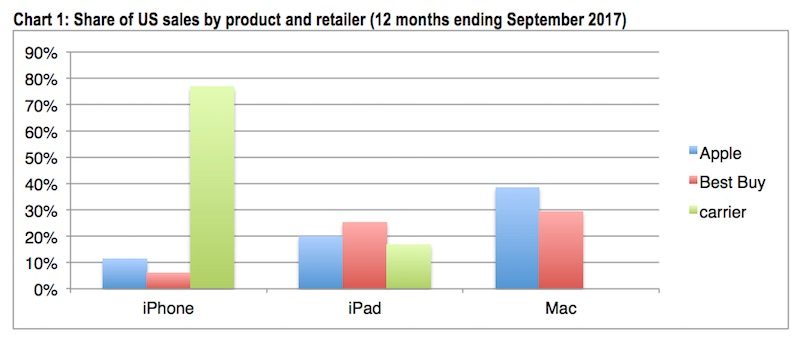
"Since Apple designed its stores originally to promote Mac computers, it is not surprising that that they continue to account for roughly 40 percent of Mac sales," said Josh Lowitz, co-founder of Consumer Intelligence Research Partners.
While it's generally unsurprising that Apple is the most popular Mac retailer, given it creates the computers, it is still notable given there are often better deals available from third-party resellers like B&H and MacMall.
By comparison, the survey found only around 20 percent of iPads and 10 percent of iPhones were sold directly by Apple.
In terms of the iPhone, Apple had the lowest share of iPhone sales in the 12 months ending September 2017. Roughly 77 percent of customers made their purchase through a carrier like Verizon or AT&T, according to CIRP.
The research firm said sales can fluctuate based on the timing of product launches and during the back-to-school and holiday shopping seasons.
Source: macrumors









