 NEWS
NEWS
iPhone 8, iPhone X Lack Support For T-Mobile's New 600 MHz Extended LTE Network
 09/19/2017
 3963
3963
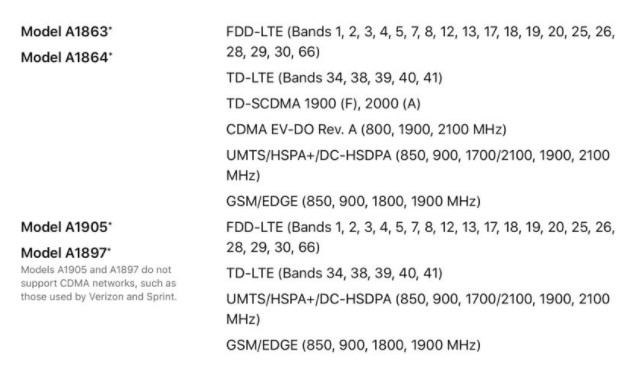
The technical specifications for Apple's new iPhone 8 and iPhone X lack a discrete entry for the 600MHz spectrum required to use T-Mobile's new multi-billion dollar LTE network on Band 71 —but at present, only one other smartphone has support for the frequency.
To explicitly support the new network, the phones need to support Band 71, or the 600MHz spectrum. The absence of the frequency support means nothing to other carriers —but the new LTE Extended network that T-Mobile has been building out won't be accessible to iPhone 8 or iPhone X users and it cannot be enabled in software.
The 600MHz spectrum provides better coverage inside buildings, and ranges farther from towers allowing for better rural coverage. The network will be available in full in 2020 —at which point there will be two more generations of iPhones.
T-Mobile claims that phones from Samsung and LG will be supported on the frequency in the last calendar quarter of 2017. At present, only the unlocked LG V30 is compatible with T-Mobile's LTE Extended network.
Qualcomm Technologies has confirmed support of the 600 MHz spectrum in the Snapdragon X16 LTE modem embedded in the Snapdragon 835 mobile platform and the WTR5975 RF transceiver that it pairs with. The X16 modem is included in the Galaxy S8, LG G6, and Galaxy Note 8 —but other components needed to support the frequency are not.
Band 71 support first rolled out in Cheyenne, Wyo., in August. In 2017, additional 600 MHz sites are slated for locations including northwest Oregon, west Texas, southwest Kansas, the Oklahoma panhandle, western North Dakota, Maine, coastal North Carolina, central Pennsylvania, central Virginia and eastern Washington.
T-Mobile spent $8 billion on the frequency auction in April to acquire 45 percent of the spectrum. It is unclear what the carrier has doled out to build the network.
Source: appleinsider










