
NEWS

'iPhone 8' Dummy Unit shows Off Alleged Gold/Copper Color

08/10/2017

4588

Photos of a supposed "iPhone 8" design dummy published on Wednesday depict the device in a rumored gold/copper color, though the dummy's provenance is unknown.
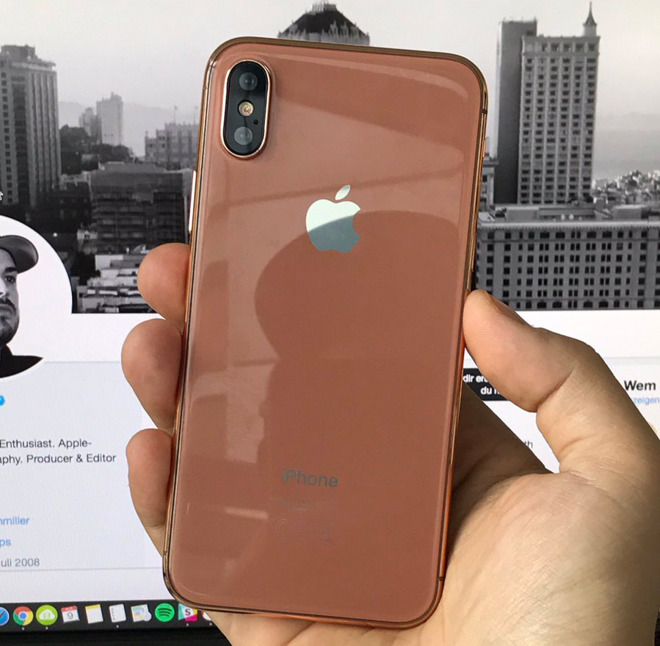

 'iPhone 8' Dummy Unit shows Off Alleged Gold/Copper Color


The dummy is consistent with other "iPhone 8" rumors pointing to a glass back, a vertically-aligned dual-lens camera, and an edge-to-edge OLED display with a sensor "notch" at the top. Several photos of the mockup were shared by Giga.de editor Ben Miller.


The unit is similar to hardware that recently appeared on China's Weibo, down to the notch and front bezels being all-white. It's more likely that shipping phones will make these sections black so as to blend with the display.
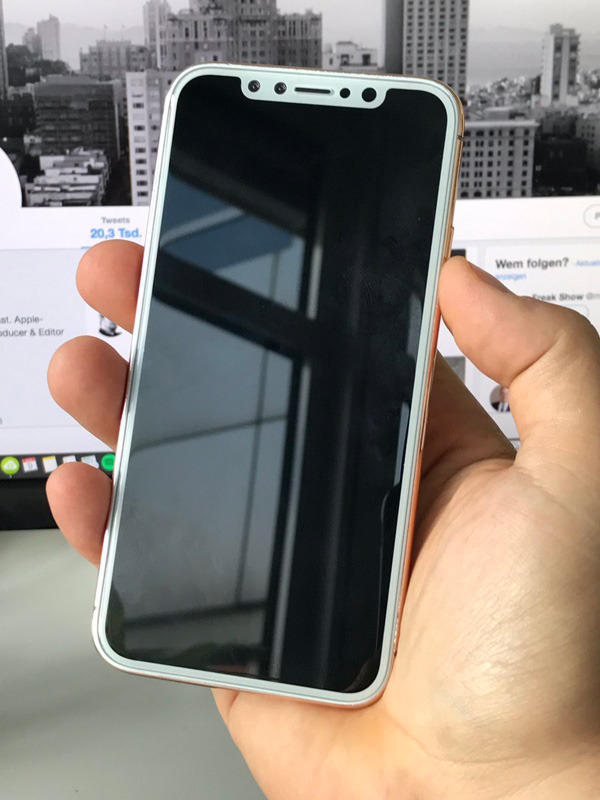

 'iPhone 8' Dummy Unit shows Off Alleged Gold/Copper Color


On Tuesday, well-connected KGI Securities analyst Ming-Chi Kuo claimed that the "iPhone 8" will launch this September in three colors: black, silver, and gold. That would mark a sharp reduction versus the iPhone 7, which is available in six —black, "jet" black, silver, gold, rose gold, and finally (Product)Red.


A decision to scale back may have been made because of production issues. Kuo has predicted that as few as 2 to 4 million units could be ready this quarter, even if manufacturing scales up rapidly.


The "iPhone 8" should offer features like an "A11" processor, 3D facial recognition, and faster and/or wireless charging. A physical home button should be replaced with a virtual one, though it's still uncertain how Apple will cope with Touch ID if it doesn't just replace it with facial recognition.


Source: appleinsider


Windows
Mac OS
iOS
Linux
3uTools
Win 64-bit For this device
V9.0 2025-11-11
Download
Win 32-bit For this device
V9.0 2025-11-11
Download
3uTools
Intel Chip How to Identify Chip Type
V9.0 2025-12-02
Download
Apple Chip
V9.0 2025-12-02
Download
How to Identify Chip Type
1.  Click the Apple icon in the top-left corner of the screen and select About This Mac.
2.  Check the Processor or Chip field to determine if it is "Intel" or "Apple".
Please use the 3uTools PC client to install the iOS client:
1、 Install either the Windows or Mac version of 3uTools on your computer
2、 Open the PC client and connect your device to the computer via USB cable
3、 After the connection is successful, wait for the computer to automatically install the mobile app for the device, or locate “Install Mobile App” on the computer and manually click to install.
3uTools
deb file
V3.01 2025-11-20
Download
rpm file
V3.01 2025-11-20
Download
Windows
Windows
iOS
iOS
Android
Android
TV
TV
3uAirPlayer
Win 64-bit For this device
V6.0.2 2025-11-19
Download
Win 32-bit For this device
V6.0.2 2025-11-19
Download
iOS Device Mirroring (No App Required)
1、 Install 3uAirPlayer on the Windows PC
2、 Open Control Center and select Screen Mirroring
3、 From the list, choose your PC to start mirroring
4、 Or connect your iOS device to the PC via USB to begin mirroring
Scan to get "3uAirPlayer" App
3uAirPlayer TV V1.0.18
2025-11-28
TV System Requirements: Android 7.0 or later
Download the TV installation package, copy it to a USB drive, insert it into your TV or set-top box, then select the file from the home screen to install.




