 NEWS
NEWS
Apple Maps Vehicles Begin Surveying Connecticut, Imagery Could Aid Apple's Autonomous Driving
 05/08/2017
 4172
4172
Apple has updated its website to indicate that its Apple Maps vehicles will begin surveying Connecticut for the first time this month. 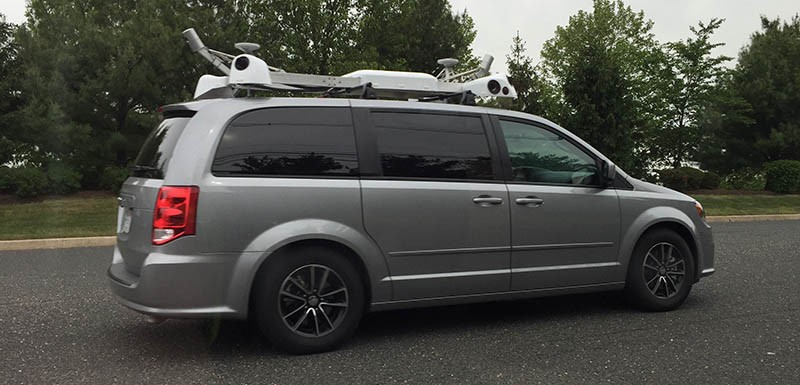
For nearly two years, Apple has been driving vehicles around the world to collect data for Apple Maps—widely believed to be street-level imagery. Since 2015, the vehicles have surveyed over 30 states in the United States, in addition to parts of the United Kingdom, Italy, France, and Sweden.
Apple said it will blur faces and license plates on collected images prior to publication, suggesting that it could be working on adding a Street View feature to Apple Maps, similar to what Google Maps has offered for several years. But, the imagery and other mapping data could be used for a variety of purposes.
When Apple's fleet of Dodge Caravans first hit the streets, it was speculated they could be the basis of an Apple Car. But those rumors quieted down after the vans were labeled with Apple Maps decals, and because Apple has shifted towards autonomous driving software, rather than an entire vehicle, at least for now.
Moreover, the California Department of Motor Vehicles confirmed that Apple is using a fleet of Lexus SUVs, which have since been spotted on the road, to test self-driving software. It's known that Apple's platform currently uses a Logitech wheel and pedals, and drivers can take over manually if necessary.
Nevertheless, so-called Apple Maps vehicles could still be playing a role in the company's autonomous driving plans.
Neil Cybart, an independent Apple analyst at Above Avalon, told MacRumors that Apple Maps vehicles are "very likely capturing mapping data," such as street level imagery, that will aid Apple's autonomous driving efforts.
"I don't think these Apple Maps vehicles are just meant to improve Apple Maps. Instead, my suspicion is they are part of Project Titan. Specifically, the vehicles are likely playing a role in building the groundwork for Apple's autonomous driving technology. The data collected by these vehicles may be used for testing autonomous driving technology using indoor simulation."
Cybart, who confirmed seeing an Apple Maps vehicle in Connecticut earlier this week, said the mapping data collected could be a "foundation" for Apple's autonomous driving technology platform.
"Apple Maps vehicles are not autonomous cars. Instead, they are very likely capturing mapping data (i.e. imagery) that will aid Apple's autonomous driving efforts. My view is that this mapping data isn't just for Apple Maps Street View, which wouldn't be too useful, but rather for building a mapping foundation for Apple's autonomous driving technology platform."
Connecticut and many other states that Apple has surveyed don't currently allow autonomous vehicle testing on their public roads, so Apple very likely is collecting data only, as it says. Whether that data is used for a Street View feature, autonomous driving software, or both, remains to be seen.
Source: macrumors










