 NEWS
NEWS
Apple Invents An Advanced Lubrication System to Protect iPhone Display
 04/01/2017
 4146
4146
Today the US Patent & Trademark Office published yet another patent application from Apple relating to foldable displays for bendable devices like an iPhone. According to Apple's filing, the iPhone's housing for a foldable design may be formed of plastic, glass, ceramics, fiber composites, metal (e.g., stainless steel, aluminum, etc.), other suitable materials, or a combination of any two or more of these materials. This supports many recent rumors of Apple working on a glass or ceramic iPhone body for the future. Today's invention focuses on a unique lubrication system to support bendable displays so as to protect them from bending, twisting and folding over many years of ownership.
An electronic device may have a display. The device and display may bend about a bend axis. The display may have flexible layers to accommodate bending.
The display layers may include layers such as an organic light-emitting diode layer or other layer with pixels, a touch sensor layer, a protective layer with a polarizer, and a support layer. Lubrication layers formed from textured surfaces, slippery coatings, and lubricants such as oil or other liquids may be interposed between the layers of the display so that the display layers slip past each other during bending of the device and display. This helps prevent stress from building up in the display as the display bends and therefore allows the display to bend without damage.
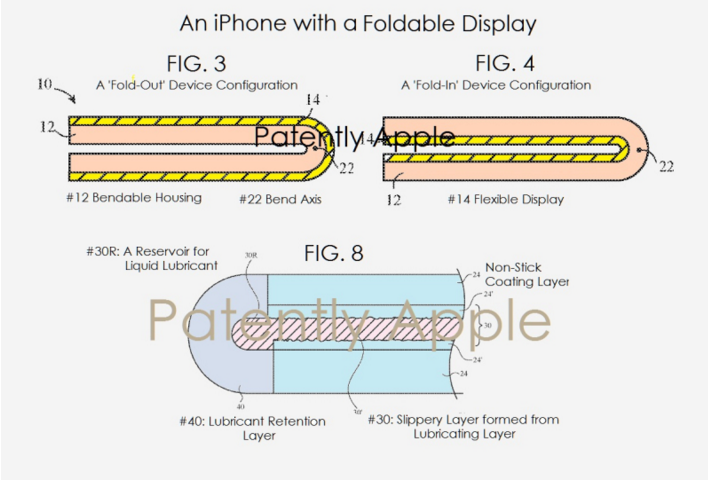
The electronic device may have a housing in which the display is mounted. The housing may have a recess that receives the edges of the display or may have other structures that help retain the display within the housing while allowing the display layers to shift relative to each other during bending. Elastomeric gaskets and elastomeric lubricant retention structures may be used to mount the display layers in the housing and to retain liquid lubricant within the layers of the display. Anchors may be used to hold display layers together during bending. An anchor may, as an example, bridge a layer of liquid lubricant that is interposed between adjacent displayer layers and may overlap the bend axis.
The iPhone (or other foldable device) may be provided with structures such as a bezel structure or other structures that help retain the display within the housing #12 and device 10 during bending and lateral movement of the layers.
When the iPhone is bent about bend axis #22, the layers of the display 14 may slip over one another. Edge features of the display such as structure #40 may be formed from a material that can deform to accommodate shifting of the relative positions of the edges of the layers.
Source: patentlyiphone










