 NEWS
NEWS
Mobile World Congress: Apple ranking 17
 03/07/2017
 3317
3317
Mobile World Congress is the industry's largest event for smartphone launches. Everyone who's anyone is there –unless your company name isApple Inc.
MWC 2017 officially started today, but the big announcements took place over the weekend.
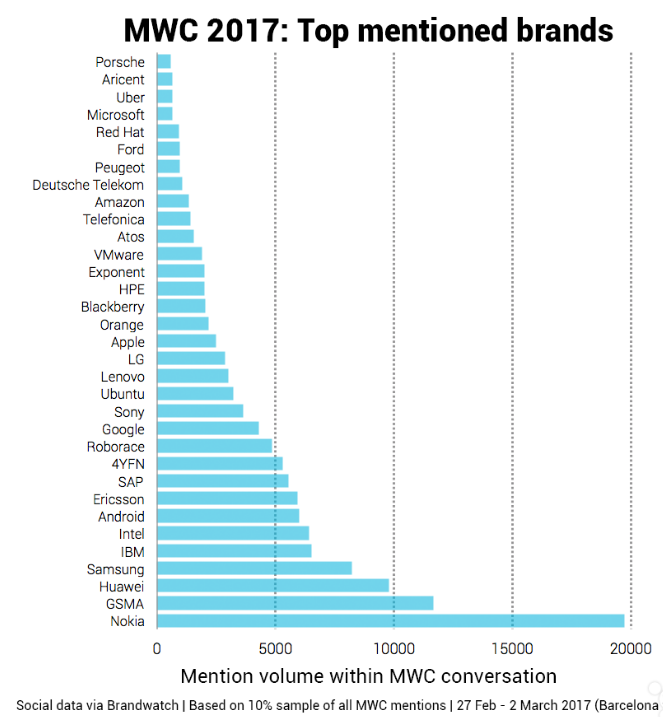
And in many ways, they set the stage for the coming battle for best smartphone that will pit Apple’s 10th anniversary iPhone 8 and Samsung Electronics Co Ltd's (OTCMKTS:SSNLF) comeback Galaxy S8 against everyone else.
While bezels are still there, they’re been minimized by moving the power button and fingerprint sensor to the back. The result is a 5.7-inch display in a compact body — and the display is wowing with its 564 ppi pixel density and support for HDR. The LG G6 also has a dual lens 13 megapixel camera, but unlike the iPhone 7 Plus, the extra lens is wide angle rather than telephone.
Another interesting flagship release is the P10 from China's Huawei. This new premium smartphone includes Leica-branded cameras and a Portrait Mode to compete with iPhone 7 Plus feature. In addition, the P10 uses Huawei’s own processor, the Kirin 960. This is bad news for Qualcomm, Inc.(NASDAQ:QCOM), which is seeing more smartphone makers follow the lead of Apple by ditching the Snapdragon to develop their own customized chips.
When the iPhone 8 arrives in the fall, its expected all-glass design isn’t going to be as unique as Apple might have hoped. Cameras are going to be a big battleground, too, putting pressure on Apple to go further than it did with the dual-lens iPhone 7 Plus.
Source: investplace









