
NEWS

Apple Pencil with USB-C Now Available in Apple's Refurbished Store in These Countries

07/09/2024

1770

Apple today added the lower-cost Apple Pencil with a USB-C port to its online refurbished store for the first time in select European countries, including Austria, Belgium, Germany, Ireland, Italy, the Netherlands, Poland, Spain, Switzerland, and the UK.
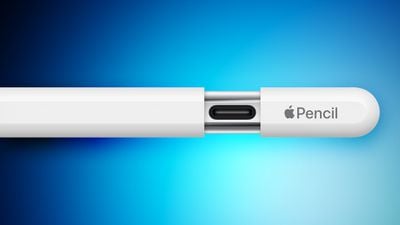
 

Apple Pencil with USB-C Now Available in Apple's Refurbished Store in These Countries


The refurbished model is discounted by around 15% in each country. For example, pricing is set at £69 in the UK, down from £79 brand new.


Originally released in November 2023, the lower-cost Apple Pencil has a similar design as the Apple Pencil 2 and Apple Pencil Pro, but with a USB-C port hidden under a sliding cap for charging and pairing with a USB-C cable. It attaches magnetically to any iPad with a USB-C port, but it does not support wireless charging or wireless pairing. It also lacks pressure sensitivity and a double-tap gesture for switching between drawing tools.


Apple says its refurbished products undergo full functionality testing, and are subject to a thorough cleaning process and inspection. The refurbished Apple Pencils are repackaged in a plainer white box with a refurbished label.


Availability of the refurbished USB-C Apple Pencil will likely extend to the U.S., Canada, Australia, New Zealand, and other countries within the next few weeks.


Source: Macrumors

Windows
Mac OS
iOS
Linux
3uTools
Win 64-bit For this device
V9.0 2025-11-11
Download
Win 32-bit For this device
V9.0 2025-11-11
Download
3uTools
Intel Chip How to Identify Chip Type
V9.0 2025-12-02
Download
Apple Chip
V9.0 2025-12-02
Download
How to Identify Chip Type
1.  Click the Apple icon in the top-left corner of the screen and select About This Mac.
2.  Check the Processor or Chip field to determine if it is "Intel" or "Apple".
Please use the 3uTools PC client to install the iOS client:
1、 Install either the Windows or Mac version of 3uTools on your computer
2、 Open the PC client and connect your device to the computer via USB cable
3、 After the connection is successful, wait for the computer to automatically install the mobile app for the device, or locate “Install Mobile App” on the computer and manually click to install.
3uTools
deb file
V3.01 2025-11-20
Download
rpm file
V3.01 2025-11-20
Download
Windows
Windows
iOS
iOS
Android
Android
TV
TV
3uAirPlayer
Win 64-bit For this device
V6.0.2 2025-11-19
Download
Win 32-bit For this device
V6.0.2 2025-11-19
Download
iOS Device Mirroring (No App Required)
1、 Install 3uAirPlayer on the Windows PC
2、 Open Control Center and select Screen Mirroring
3、 From the list, choose your PC to start mirroring
4、 Or connect your iOS device to the PC via USB to begin mirroring
Scan to get "3uAirPlayer" App
3uAirPlayer TV V1.0.18
2025-11-28
TV System Requirements: Android 7.0 or later
Download the TV installation package, copy it to a USB drive, insert it into your TV or set-top box, then select the file from the home screen to install.




