
TUTORIALS

How to Speed up Safari Browsing on iOS 11?

05/16/2018

9667

There is no doubt that Safari is the most common browser on iPhone. It is the default web browser and can be launched directly from third-party apps. If you are annoyed by Safari’s middling performance, iOS 11 hidden features on Safari can help you improve its user experience.

How to Speed up  Safari Browsing on iOS 11?


iOS presets these features unable. As the follow steps, enable these features to make improvement.


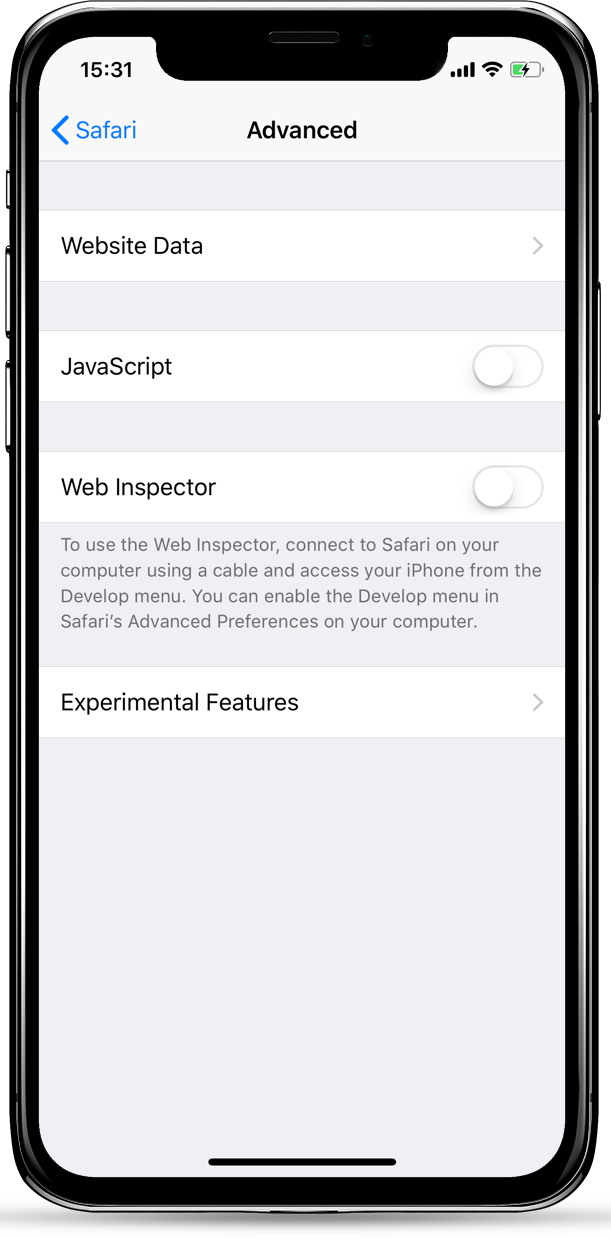
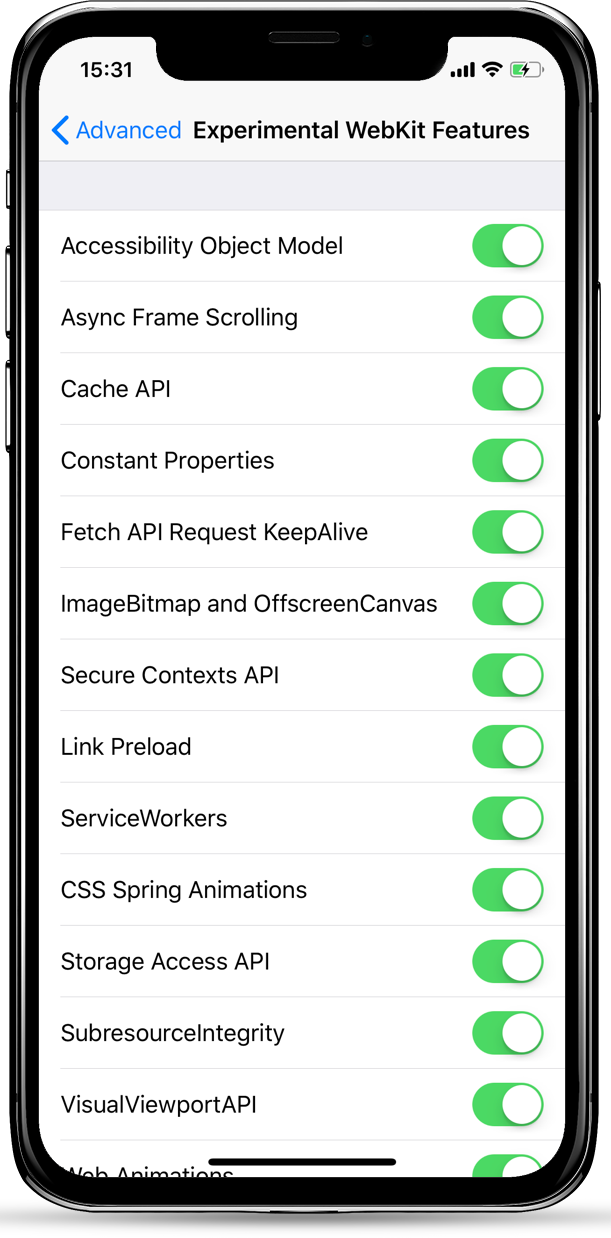
Navigate to Settings -> Safari -> Advanced, then open Experimental Features. There are features that you can experience, some are enable, the others are closed off. These features are for iOS developers to test. According to the iOS version or product type, there are differences.
 

How to Speed up  Safari Browsing on iOS 11?How to Speed up  Safari Browsing on iOS 11?


To get faster speed of Safari, you can just enable all the option( Web Animation could be closed off.) After that, however, you may not normally view some pages(Unusual case). If you meet this, just close off back the features you enabled. So it is importance to take a screenshot of the default settings.


What do those features mean? Here are some important features;


Async Frame Scrolling: Allow web page in iframe run more smoothly.

CSS Spring Animations: Simulate animation effect with CSS.

Secure Contexts API: Protect iPhone against API attack from hackers.

Web Animations: Improve the speed of web animations.

WebGPU: Offer GPU acceleration while browsing.


Windows
Mac OS
iOS
Linux
3uTools
Win 64-bit For this device
V9.0 2025-11-11
Download
Win 32-bit For this device
V9.0 2025-11-11
Download
3uTools
Intel Chip How to Identify Chip Type
V9.0 2025-12-02
Download
Apple Chip
V9.0 2025-12-02
Download
How to Identify Chip Type
1.  Click the Apple icon in the top-left corner of the screen and select About This Mac.
2.  Check the Processor or Chip field to determine if it is "Intel" or "Apple".
Please use the 3uTools PC client to install the iOS client:
1、 Install either the Windows or Mac version of 3uTools on your computer
2、 Open the PC client and connect your device to the computer via USB cable
3、 After the connection is successful, wait for the computer to automatically install the mobile app for the device, or locate “Install Mobile App” on the computer and manually click to install.
3uTools
deb file
V3.01 2025-11-20
Download
rpm file
V3.01 2025-11-20
Download
Windows
Windows
iOS
iOS
Android
Android
TV
TV
3uAirPlayer
Win 64-bit For this device
V6.0.2 2025-11-19
Download
Win 32-bit For this device
V6.0.2 2025-11-19
Download
iOS Device Mirroring (No App Required)
1、 Install 3uAirPlayer on the Windows PC
2、 Open Control Center and select Screen Mirroring
3、 From the list, choose your PC to start mirroring
4、 Or connect your iOS device to the PC via USB to begin mirroring
Scan to get "3uAirPlayer" App
3uAirPlayer TV V1.0.18
2025-11-28
TV System Requirements: Android 7.0 or later
Download the TV installation package, copy it to a USB drive, insert it into your TV or set-top box, then select the file from the home screen to install.




