 TUTORIALS
A Summary of Current Jailbreak Tools
 03/02/2018
 12645
12645
In times gone by, jailbreaks would come in the form of one tool per firmware range. These tools often have different advantages and limitations, and can become hard to differentiate. In this article, we'll summarise the current tools, as well as how they differ from the rest.
iOS 11
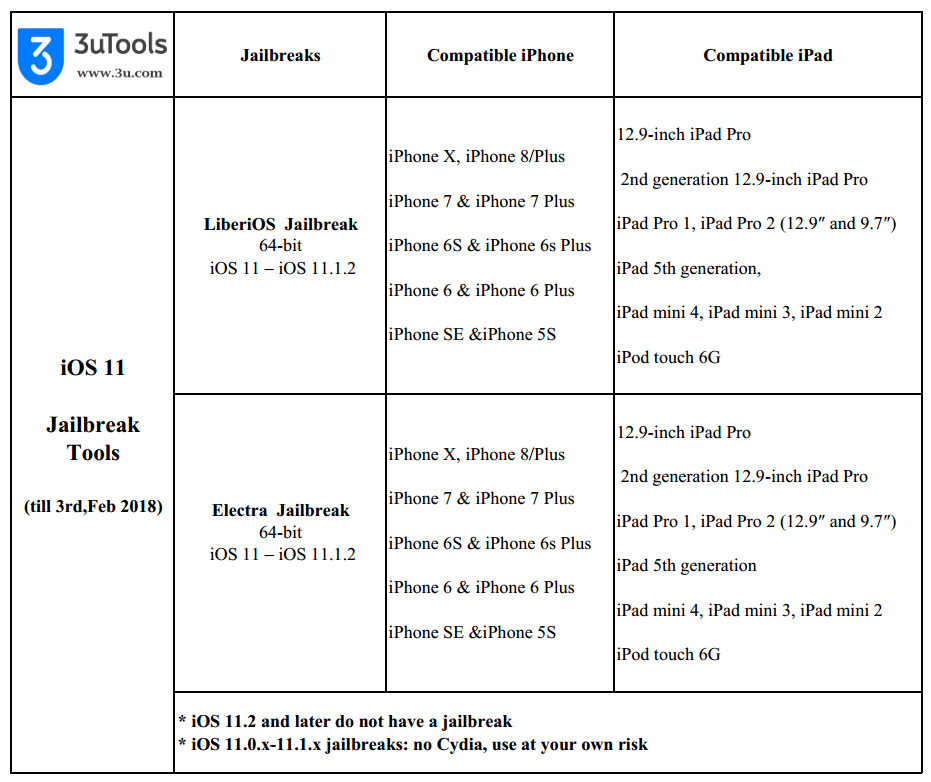
iOS 11.2 and above have no jailbreak. For iOS 11.1.2 and below there are a few things on offer, in various stages of readiness.
LiberiOS
LiberiOS is an example of a new type of jailbreak, one without a KPP bypass. So-called KPP-less jailbreaks can boast superior stability to ones which use a bypass, but currently suffer from downsides. As they do not bypass KPP they cannot modify areas of the kernel which are checked by KPP.
Instead, they modify only safe areas, making them very stable. However, in order to do this and still achieve the effects we want they must constantly run a daemon to inject their changes into the system. The use of this jailbreak daemon is viewed by some as an inelegant solution, and could have reliability or battery life concerns, though this hasn't been proven. More of an issue is that Cydia Substrate and some of its dependencies are not yet updated to work with this jailbreakd approach. LiberiOS lacks Cydia (Substrate) support for this reason, and may not get it.
It should be noted that future jailbreaks will almost certainly be of this type, as KPP bypasses are hard to come by. The stability offered by this methodology looks to be the way forward, once compatibility with Substrate is ironed out. All iOS 11 jailbreaks are KPP-less. For iOS 10 the field is split, with Meridian being KPP-less, and G0blin (and some older tools) using a bypass.
LiberiOS supports iOS 11.0-11.1.2, on all devices.
Electra
Made by CoolStar, Electra uses the same exploit as LiberiOS, though packaged independently. Unlike LiberiOS this tool has made some attempts to resolve the incompatibilities with the Cydia platform. Without a working Cydia Substrate, CoolStar has bundled Substitute instead. This is an open-source Cydia Substrate alternative made by Comex. It has the same functionality as Substrate, but can be freely updated to work with KPP-less jailbreaks. Saurik does not approve of Substitute, nor of a jailbreakd approach, and it remains to be what his own solution will be for KPP-less Substrate support.
Electra supports all 64-bit devices on iOS 11.0-11.1.2 and can install tweaks due to Substitute. However, it does not yet bundle Cydia as several of its dependencies like apt and dpkg are not updated for it. All tweaks must be installed manually from the command line, requiring a little more technical expertise than the average Cydia user is used to.
Saurik's unknown solution
The current status and rate of progress of this project is unknown, though it has been confirmed to be underway. It may lack the addition of the jailbreak daemon, which is required by other KPP-less tools, as Saurik has commented on his perceived inelegance of it as a solution. For more information, see the explanation under LiberiOS. Do not expect any status updates on this project, though once released it will have the advantage of official support for Cydia and Cydia Substrate, without recourse to the command line, and without Substitute.
iOS 10
iOS 10.0-10.2.1 already had jailbreaks, which we have covered in detail before. For iOS 10.3-10.3.3, there are again a couple of tools to choose between.
Meridian
This tool supports all 64-bit devices on all iOS 10.x firmwares. However, if you are on iOS 10.2.1 or below you’d be better off jailbreaking with existing tools, such as Yalu, extra_recipe, or Saïgon, for the time being. If you're on iOS 10.3.x, you should consider using G0blin instead of this too, at least for now. The reason for this is that as Meridian is a KPP-less jailbreak it does not yet support Cydia Substrate, making it unsuitable for the average user.
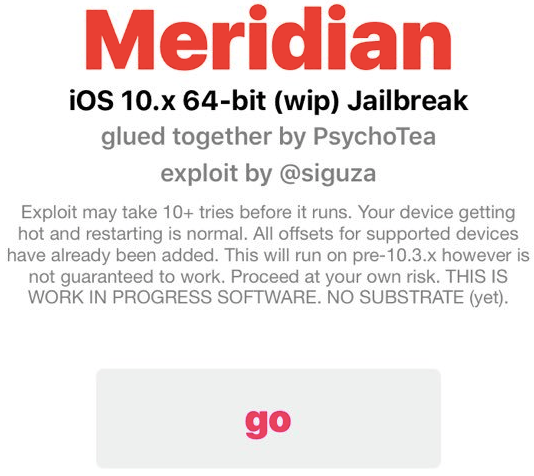
At the present time, Meridian is recommended for developers only, not advisable for everyday inexpert use. All changes must be made from the command line, any tweaks requiring Substrate will not work, and any problems will likely require a good amount of knowledge to get out of.
Read about Meridian jailbreak
G0blin
This is a traditional jailbreak tool, of the kind we are used to seeing. It is not KPP-less, instead using a KPP bypass like Yalu, extra_recipe and Saïgon. Consequently, it doesn’t need a jailbreak daemon, nor does it need an updated Cydia Substrate. This is good news for the average user as it already includes Cydia and Substrate, and all your tweaks will work as you expect. For more information on KPP-less, see the section on LiberiOS.
One downside to G0blin is possible instability caused by the KPP bypass, similar to what you may have experienced with Yalu and extra_recipe. Another hitch is that it does not cover every device and firmware, unlike Meridian. G0blin supports only iOS 10.3-10.3.3, and only A7-A9 devices. This means the iPhone 7 (Plus) and newer cannot use this tool. Only iPhone 6s (Plus) and older will ever be compatible. Finally, G0blin currently has a known bug where Touch ID does not function in third-party apps, though this will hopefully be remedied soon.
G0blin is the obvious choice for iOS 10.3.x jailbreaking for now, due to its Substrate support. In the future it will be interesting to see if KPP-less Meridian can exceed it in terms of stability, especially for those with an A10(X) device, which G0blin cannot support.
Can you jailbreak your iPhone? Check table here for iOS 10 jailbreak:
Source: idownloadblog










