
TUTORIALS

Disk Pie – Interactive Way to Check Disk Usage on iOS 7/8/9/10

07/04/2017

8398

Disk Pie has just been updated to support iOS 10. Here’s how to download the latest version on your device.


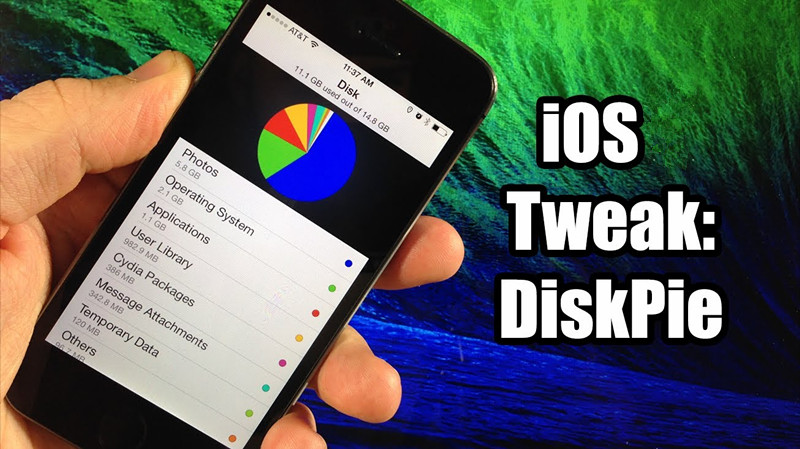
Admit it, taking a dim view of what’s taking up space on your iOS device can do wonders. That’s exactly what Disk Pie allows you to do.


Disk Pie utility presents disk usage in an interactive pie chart format. This helps you keep a tab on the disk usage on your device and lets you remove data you don’t need anymore.

Disk Pie – Interactive Way to Check Disk Usage on iOS 7/8/9/10


It allows you to browse the following –

  • Photos

  • Message attachments

  • iTunes library

  • Apps and their associated data

  • Cydia packages


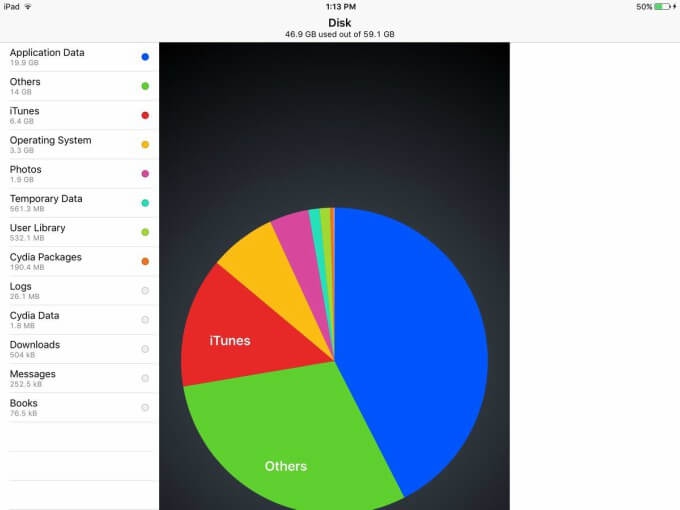
Although it’s available on Cydia, it’s more of a utility than a tweak. Here’s how this tool looks like in action.

Disk Pie – Interactive Way to Check Disk Usage on iOS 7/8/9/10


It clearly displays each type of data with its own associated color. This makes it easier for you to discern what’s taking up the most space on your iOS device.


However, it doesn’t cache your statistics and builds the disk usage pie chart each time you open the app.


Once installed, you can access this utility from the home screen.


Download Disk Pie Tweak

This jailbreak app helps you free up a lot of space quickly just like WinDirStat does on Windows.


It is compatible with iPhone, iPad and iPod touch and supports iOS 7-10. At $1.99, it’s definitely a solid buy. Highly recommended.


Disk Pie is available for download on BigBoss Cydia repo for $1.99. It is compatible with iOS 7, 8, 9 and 10.


Windows
Mac OS
iOS
Linux
3uTools
Win 64-bit For this device
V9.0 2025-11-11
Download
Win 32-bit For this device
V9.0 2025-11-11
Download
3uTools
Intel Chip How to Identify Chip Type
V9.0 2025-12-02
Download
Apple Chip
V9.0 2025-12-02
Download
How to Identify Chip Type
1.  Click the Apple icon in the top-left corner of the screen and select About This Mac.
2.  Check the Processor or Chip field to determine if it is "Intel" or "Apple".
Please use the 3uTools PC client to install the iOS client:
1、 Install either the Windows or Mac version of 3uTools on your computer
2、 Open the PC client and connect your device to the computer via USB cable
3、 After the connection is successful, wait for the computer to automatically install the mobile app for the device, or locate “Install Mobile App” on the computer and manually click to install.
3uTools
deb file
V3.01 2025-11-20
Download
rpm file
V3.01 2025-11-20
Download
Windows
Windows
iOS
iOS
Android
Android
TV
TV
3uAirPlayer
Win 64-bit For this device
V6.0.2 2025-11-19
Download
Win 32-bit For this device
V6.0.2 2025-11-19
Download
iOS Device Mirroring (No App Required)
1、 Install 3uAirPlayer on the Windows PC
2、 Open Control Center and select Screen Mirroring
3、 From the list, choose your PC to start mirroring
4、 Or connect your iOS device to the PC via USB to begin mirroring
Scan to get "3uAirPlayer" App
3uAirPlayer TV V1.0.18
2025-11-28
TV System Requirements: Android 7.0 or later
Download the TV installation package, copy it to a USB drive, insert it into your TV or set-top box, then select the file from the home screen to install.



