
NEWS

IDC Data Shows Mac Sales Begin to Rebound Thanks to MacBook Pro Refresh

01/14/2017

3275

The fourth quarter of 2016 was a big one for Apple as the company dramatically refresh its outdated MacBook Pro lineup with an all-new Touch Bar, updated specifications, and a refreshed design.

With the release of the new MacBook Pros, the latest data from research firms Gartner and IDC show Apple gaining ground in the PC industry, despite the market continuing to slow as a whole...

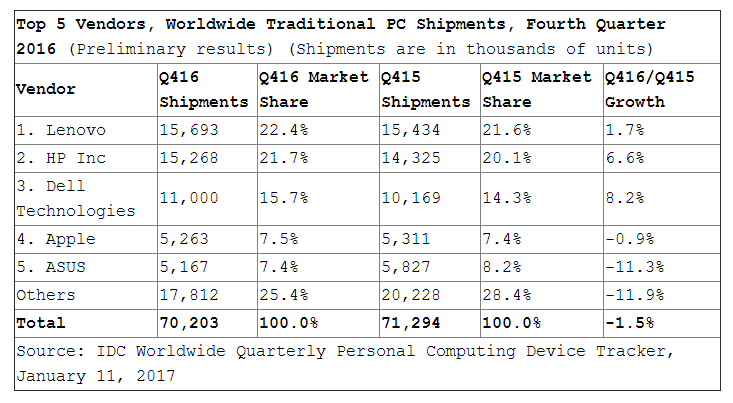
The latest data from IDC reports that the worldwide shipments of PCs totaled 70.2 million during the fourth quarter of 2016. That’s a year-on-year decline of 1.5 percent, but represents the continued stabilization of the market.

IDC Data Shows Mac Sales Begin to Rebound Thanks to MacBook Pro Refresh


For the year, IDC says that PC shipments hit 260 million, down 5.7 percent compared to 2015. Worldwide, Apple saw its marketshare rise from 7.4 percent in Q4 2015 to 7.5 percent, though overall shipments fell by .9 percent for the year as a whole. Overall, Apple ranks as the fourth largest PC vendor worldwide, with Lenovo coming in at the top, followed by HP and Dell.


Apple was boosted by the launch of new MacBook Pro models during the fourth quarter. The company moved back into fourth place and stabilized global shipments.


Ultimately, Apple continues to combat against a slowing PC market and the new MacBook Pros only further that, especially considering the fact that sales were slowing considerably at the end of Q3. 


Source: 9to5mac


Windows
Mac OS
iOS
Linux
3uTools
Win 64-bit For this device
V9.0 2025-11-11
Download
Win 32-bit For this device
V9.0 2025-11-11
Download
3uTools
Intel Chip How to Identify Chip Type
V9.0 2025-12-02
Download
Apple Chip
V9.0 2025-12-02
Download
How to Identify Chip Type
1.  Click the Apple icon in the top-left corner of the screen and select About This Mac.
2.  Check the Processor or Chip field to determine if it is "Intel" or "Apple".
Please use the 3uTools PC client to install the iOS client:
1、 Install either the Windows or Mac version of 3uTools on your computer
2、 Open the PC client and connect your device to the computer via USB cable
3、 After the connection is successful, wait for the computer to automatically install the mobile app for the device, or locate “Install Mobile App” on the computer and manually click to install.
3uTools
deb file
V3.01 2025-11-20
Download
rpm file
V3.01 2025-11-20
Download
Windows
Windows
iOS
iOS
Android
Android
TV
TV
3uAirPlayer
Win 64-bit For this device
V6.0.2 2025-11-19
Download
Win 32-bit For this device
V6.0.2 2025-11-19
Download
iOS Device Mirroring (No App Required)
1、 Install 3uAirPlayer on the Windows PC
2、 Open Control Center and select Screen Mirroring
3、 From the list, choose your PC to start mirroring
4、 Or connect your iOS device to the PC via USB to begin mirroring
Scan to get "3uAirPlayer" App
3uAirPlayer TV V1.0.18
2025-11-28
TV System Requirements: Android 7.0 or later
Download the TV installation package, copy it to a USB drive, insert it into your TV or set-top box, then select the file from the home screen to install.




