NEWS

Apple's iOS 10 Now on 3 Out of 4 Compatible Devices

01/09/2017

3006

Apple's iOS 10 Now on 3 Out of 4 Compatible Devices


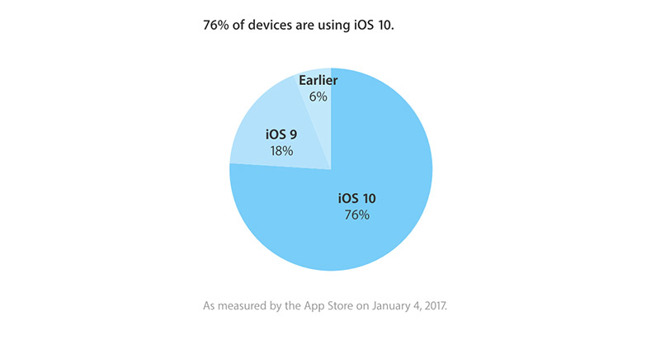
According to Apple's latest numbers, published to the company's developer web portal, 76 percent of compatible iOS devices were running a version of iOS 10 as of Wednesday. 

The numbers are up significantly from Apple's last reading on Nov. 27, which showed the OS installed on only 63 percent of active devices. A month prior, data from research firm Mixpanel found iOS 10 adoption surpass the halfway mark 
in late September when the OS was tracking at 55 percent.

While Apple does not offer day-by-day statistics, it can be assumed that the holidays brought a raft of new users and late upgraders. 

Despite a sizable leap from November, iOS 10 distribution is just one percent higher than iOS 9 metrics measured at roughly the same time 
last year. At the time, the last-generation OS was gaining new converts at a rate of about one percent per week. 

Apple's resource notes 18 percent of devices visiting the App Store are still running iOS 9, while another 6 percent are on older versions of the OS. 

Apple released iOS 10 
in September with design enhancements and feature additions to Messages, Maps, Siri, Photos, Apple Music, News, and more. The company most recently issued iOS 10.2 with the new TV app and refreshed emoji characters.


You could upgrade to iOS 10 with 3uTools. 


Source: appleinsider

Windows
Mac OS
iOS
Linux
3uTools
Win 64-bit For this device
V9.0 2025-11-11
Download
Win 32-bit For this device
V9.0 2025-11-11
Download
3uTools
Intel Chip How to Identify Chip Type
V9.0 2025-12-02
Download
Apple Chip
V9.0 2025-12-02
Download
How to Identify Chip Type
1.  Click the Apple icon in the top-left corner of the screen and select About This Mac.
2.  Check the Processor or Chip field to determine if it is "Intel" or "Apple".
Please use the 3uTools PC client to install the iOS client:
1、 Install either the Windows or Mac version of 3uTools on your computer
2、 Open the PC client and connect your device to the computer via USB cable
3、 After the connection is successful, wait for the computer to automatically install the mobile app for the device, or locate “Install Mobile App” on the computer and manually click to install.
3uTools
deb file
V3.01 2025-11-20
Download
rpm file
V3.01 2025-11-20
Download
Windows
Windows
iOS
iOS
Android
Android
TV
TV
3uAirPlayer
Win 64-bit For this device
V6.0.2 2025-11-19
Download
Win 32-bit For this device
V6.0.2 2025-11-19
Download
iOS Device Mirroring (No App Required)
1、 Install 3uAirPlayer on the Windows PC
2、 Open Control Center and select Screen Mirroring
3、 From the list, choose your PC to start mirroring
4、 Or connect your iOS device to the PC via USB to begin mirroring
Scan to get "3uAirPlayer" App
3uAirPlayer TV V1.0.18
2025-11-28
TV System Requirements: Android 7.0 or later
Download the TV installation package, copy it to a USB drive, insert it into your TV or set-top box, then select the file from the home screen to install.