
NEWS

A Restaurant in San Fransisco is Plating Food on iPads

01/05/2017

2947

With a prime location in San Francisco’s Financial District, Quince is widely heralded as one of the city’s finest restaurants. It has plenty of buzz, premium pricing, an extensive wine list, and it was recently awarded its third Michelin Star. Now, it also has a dish that is served using an iPad as a plate. Because… San Francisco.


Just about everything else on the planet has a touchscreen and Wi-Fi connectivity baked in these days, so why shouldn’t the plates at fine restaurants?


Chef Michael Tusk has a James Beard award, Michelin Stars and two critically acclaimed restaurants to his credit, so it’s difficult to question any of his decisions at this point. His latest decision is as close as he’s gotten to a questionable one, though. A relatively new addition to the beloved menu at Quince is called “A Dog In Search Of Gold,” and it’s plated on an iPad Pro.


SFist first reported on a tweet from San Francisco chef Richie Nakano, who was made aware of the crazy new dish from a friend who texted him a photo, as seen in the tweet below.


The person who texted Nakano described the dish as “white truffle croquettes on iPads playing videos of water dogs on the truffle-hunt.” Sure, why not? SFist notes that several restaurants in the UK have been plating various dishes on iPads since last year, but this appears to be the first time a notable restaurant in America has jumped on what we sincerely hope is a remarkably short-lived trend.
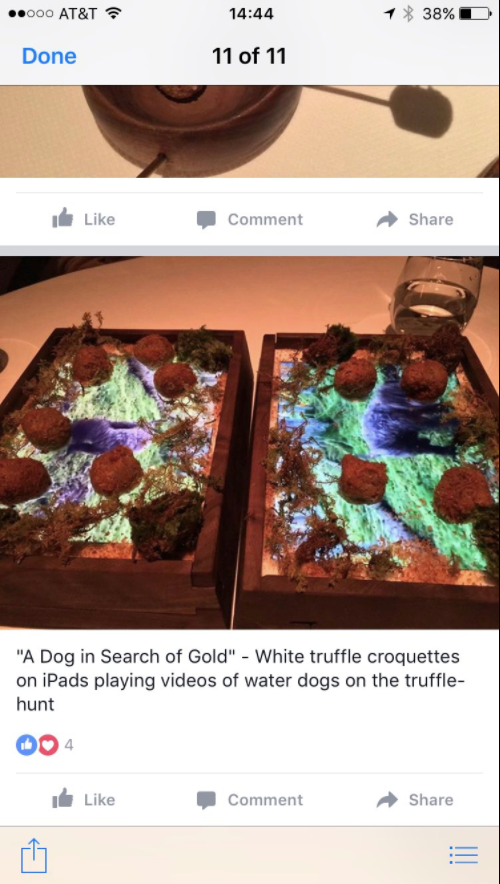

A Restaurant in San Fransisco is Plating Food on iPads


Source: BGR

Windows
Mac OS
iOS
Linux
3uTools
Win 64-bit For this device
V9.0 2025-11-11
Download
Win 32-bit For this device
V9.0 2025-11-11
Download
3uTools
Intel Chip How to Identify Chip Type
V9.0 2025-12-02
Download
Apple Chip
V9.0 2025-12-02
Download
How to Identify Chip Type
1.  Click the Apple icon in the top-left corner of the screen and select About This Mac.
2.  Check the Processor or Chip field to determine if it is "Intel" or "Apple".
Please use the 3uTools PC client to install the iOS client:
1、 Install either the Windows or Mac version of 3uTools on your computer
2、 Open the PC client and connect your device to the computer via USB cable
3、 After the connection is successful, wait for the computer to automatically install the mobile app for the device, or locate “Install Mobile App” on the computer and manually click to install.
3uTools
deb file
V3.01 2025-11-20
Download
rpm file
V3.01 2025-11-20
Download
Windows
Windows
iOS
iOS
Android
Android
TV
TV
3uAirPlayer
Win 64-bit For this device
V6.0.2 2025-11-19
Download
Win 32-bit For this device
V6.0.2 2025-11-19
Download
iOS Device Mirroring (No App Required)
1、 Install 3uAirPlayer on the Windows PC
2、 Open Control Center and select Screen Mirroring
3、 From the list, choose your PC to start mirroring
4、 Or connect your iOS device to the PC via USB to begin mirroring
Scan to get "3uAirPlayer" App
3uAirPlayer TV V1.0.18
2025-11-28
TV System Requirements: Android 7.0 or later
Download the TV installation package, copy it to a USB drive, insert it into your TV or set-top box, then select the file from the home screen to install.





