
NEWS

Apple's Squid Emoji Isn't Quite Right, As Aquarium Highlights

12/06/2018

3188

Getting emoji to look right has for some reason, been a challenge.


There was the head-scratching over Apple's very plain bagel emoji, while Unicode earlier this year fixed up the once anatomically incorrect lobster emoji.


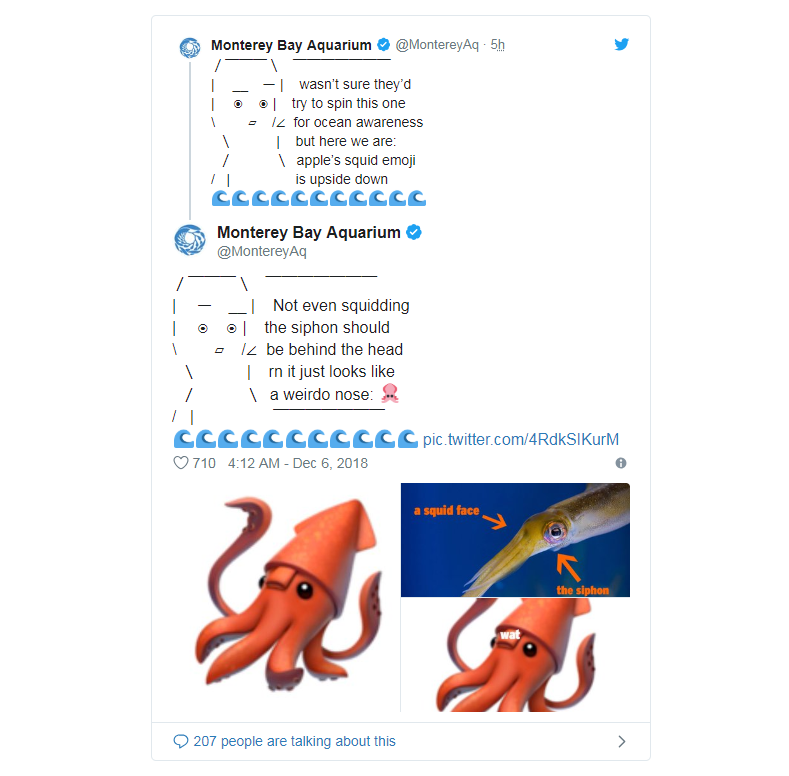
It appears there also needs to be work done on Apple's squid emoji, which was added back in 2016. 


As raised by the Monterey Bay Aquarium on Twitter, the emoji is actually upside down, and the siphon — which allows a squid to move around, and enables respiration and waste discharge — is meant to be behind the head.

 Apple's Squid Emoji Isn't Quite Right, As Aquarium Highlights


"It just looks like a weirdo's nose," the aquarium wrote.


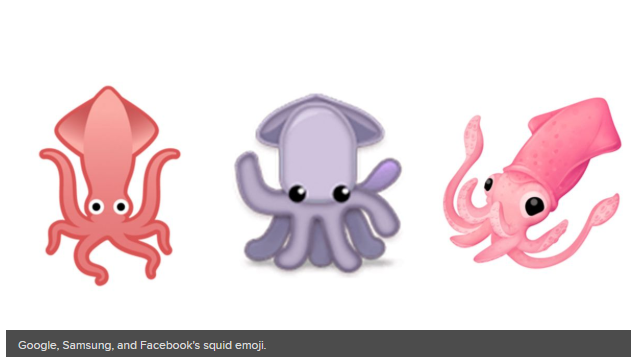
It's no such problem for other tech companies, who have mostly omitted the siphon from their designs.
 Apple's Squid Emoji Isn't Quite Right, As Aquarium Highlights


Although we've seen the lobster and bagel emoji fixed in the past, who knows if Apple will tend to the issue all these years later. 


But really, do you want to share a squid that's been expelling its own waste over its face? Probably not.


Source: mashable

Windows
Mac OS
iOS
Linux
3uTools
Win 64-bit For this device
V9.01 2025-12-27
Download
Win 32-bit For this device
V9.01 2025-12-27
Download
3uTools
Intel Chip How to Identify Chip Type
V9.01 2025-12-31
Download
Apple Silicon
V9.01 2025-12-31
Download
How to Identify Chip Type
1.  Click the Apple icon in the top-left corner of the screen and select About This Mac.
2.  Check the Processor or Chip field to determine if it is "Intel" or "Apple".
Please use the 3uTools PC client to install the iOS client:
1、 Install either the Windows or Mac version of 3uTools on your computer
2、 Open the PC client and connect your device to the computer via USB cable
3、 After the connection is successful, wait for the computer to automatically install the mobile app for the device, or locate “Install Mobile App” on the computer and manually click to install.
3uTools
deb file
V3.01 2025-11-20
Download
rpm file
V3.01 2025-11-20
Download
Windows
Windows
iOS
iOS
Android
Android
TV
TV
3uAirPlayer
Win 64-bit For this device
V6.0.2 2025-11-19
Download
Win 32-bit For this device
V6.0.2 2025-11-19
Download
iOS Device Mirroring (No App Required)
1、 Install 3uAirPlayer on the Windows PC
2、 Open Control Center and select Screen Mirroring
3、 From the list, choose your PC to start mirroring
4、 Or connect your iOS device to the PC via USB to begin mirroring
Scan to get "3uAirPlayer" App
3uAirPlayer TV V1.0.18
2025-11-28
TV System Requirements: Android 7.0 or later
Download the TV installation package, copy it to a USB drive, insert it into your TV or set-top box, then select the file from the home screen to install.




