
NEWS

Apple Events tvOS app Updated for Oct. 30 Livestream

10/26/2018

2711

Apple on Wednesday pushed out an update to its Apple Events app for Apple TV, urging users to tune into a live stream of an Oct. 30 media event in New York. 
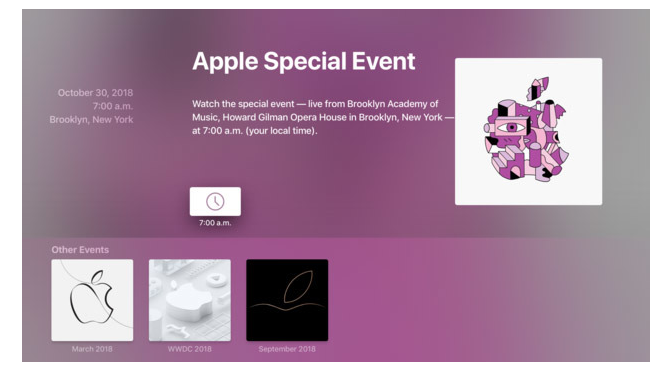

Apple Events tvOS app Updated for Oct. 30 Livestream


As it does prior to every major live-streamed press gathering, Apple gave the Apple Events app a fresh coat of paint to mark the upcoming New York City keynote, at which the company is expected to unveil iPad Pro and Mac hardware. 


In addition to a purplish background hue, the app features logo artwork pulled from one of the more than 350 unique invitations sent out to media last week. Beyond artistic renderings of Apple's logo, which strongly suggest an announcement related to iPad Pro and Apple Pencil, the announcements include the tagline "There's more in the making."


"Watch the special event — live from Brooklyn Academy of Music, Howard Gilman Opera House in Brooklyn, New York — at [local time]."


Similar to past events, the tvOS app presents local live stream viewing times using collected location information, making it easy to plan for the big day. Apple is also streaming the event to select retail stores as special Today at Apple sessions. 


Apple is widely expected to launch revamped iPad Pro models on Oct. 30. The new slates are rumored to come in 12.9- and 11-inch sizes, and feature a full-face design with reduced bezels thanks to Face ID integration. A second-generation Apple Pencil is also anticipated. 


Refreshes to the iMac, MacBook and — potentially — Mac mini lines are also in the offing. 


Source: appleinsider

Windows
Mac OS
iOS
Linux
3uTools
Win 64-bit For this device
V9.01 2025-12-27
Download
Win 32-bit For this device
V9.01 2025-12-27
Download
3uTools
Intel Chip How to Identify Chip Type
V9.01 2025-12-31
Download
Apple Silicon
V9.01 2025-12-31
Download
How to Identify Chip Type
1.  Click the Apple icon in the top-left corner of the screen and select About This Mac.
2.  Check the Processor or Chip field to determine if it is "Intel" or "Apple".
Please use the 3uTools PC client to install the iOS client:
1、 Install either the Windows or Mac version of 3uTools on your computer
2、 Open the PC client and connect your device to the computer via USB cable
3、 After the connection is successful, wait for the computer to automatically install the mobile app for the device, or locate “Install Mobile App” on the computer and manually click to install.
3uTools
deb file
V3.01 2025-11-20
Download
rpm file
V3.01 2025-11-20
Download
Windows
Windows
iOS
iOS
Android
Android
TV
TV
3uAirPlayer
Win 64-bit For this device
V6.0.2 2025-11-19
Download
Win 32-bit For this device
V6.0.2 2025-11-19
Download
iOS Device Mirroring (No App Required)
1、 Install 3uAirPlayer on the Windows PC
2、 Open Control Center and select Screen Mirroring
3、 From the list, choose your PC to start mirroring
4、 Or connect your iOS device to the PC via USB to begin mirroring
Scan to get "3uAirPlayer" App
3uAirPlayer TV V1.0.18
2025-11-28
TV System Requirements: Android 7.0 or later
Download the TV installation package, copy it to a USB drive, insert it into your TV or set-top box, then select the file from the home screen to install.




