 NEWS
NEWS
Apple's First AI Research Paper Focuses On Computer Vision
 12/27/2016
 4442
4442
Apple last week published its first scholarly research paper, an article covering methods of improving recognition in computer vision systems, marking a new direction for the traditionally secretive company.
The paper, titled "Learning from Simulated and Unsupervised Images through Adversarial Training," was submitted for review in mid-November before seeing publication through the Cornell University Library on Dec. 22.
Apple's article arrives less than a month after the company said it would no longer bar employees from publishing research relating to artificial intelligence.
Compared to training models based solely on real-world images, those leveraging synthetic data are often more efficient because computer generated images are usually labelled. For example, a synthetic image of an eye or hand is annotated as such, while real-world images depicting similar material are unknown to the algorithm and thus need to be described by a human operator.
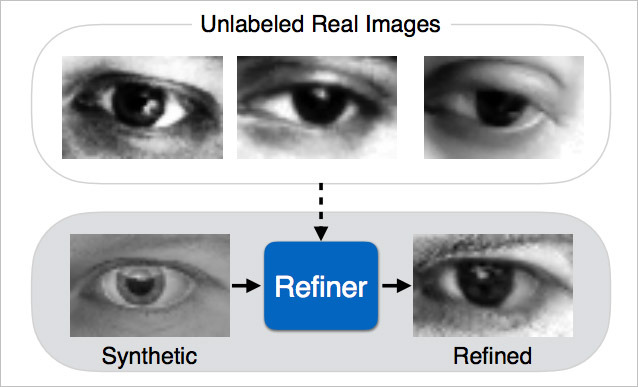
As noted by Apple, however, relying completely on simulated images might yield unsatisfactory results, as computer generated content is sometimes not realistic enough to provide an accurate learning set. To help bridge the gap, Apple proposes a system of refining a simulator's output through "Simulated+Unsupervised learning."
In practice, this particular flavor of S+U learning combines unlabeled real image data with annotated synthetic images. The technique is based in large part on Generative Adversarial Networks (GANs), which applies two competing neural networks —generator and discriminator —against each other to better discern generated data from real data. A fairly recent development, the process has seen success in the generation of photorealistic "super-resolution" images.
While not necessarily presaging upcoming consumer technology, it is interesting to note Apple elected to apply its modified GAN to the evaluation of gaze and hand pose estimation. In addition, the company says it hopes to one day move S+U learning beyond static images to video input.
Apple's first public research paper was penned by vision expert Ashish Shrivastava and a team of engineers including Tomas Pfister, Oncel Tuzel, Wenda Wang, Russ Webb and Apple Director of Artificial Intelligence Research Josh Susskind. Of note, Susskind made the announcement of Apple's newfound interest in scholarly pursuits earlier this month, a move some believe will help future recruitment efforts.
Source: appleinsider










