 NEWS
NEWS
Austrian Collection of 1,100 Macs Seeks Rescue From Disposal
 10/18/2018
 2549
2549
An Austrian repairman who possesses a large number of Apple computers is looking for a new owner for his approximately 1,100-strong collection of old Macs, one which faces the prospect of being thrown away if it cannot be rehomed.
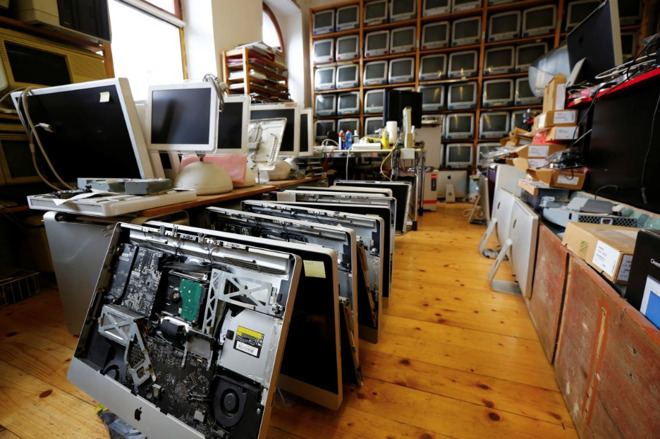
Collector Roland Borsky worked for a company repairing Apple computers, accumulating the archive of Mac models since the 1980s. The collection is believed to be the world's biggest privately owned archive of Apple products, more than double the 472 specimens at the Apple Museum in Prague.
"Just as others collect cars and live in a little box to afford them, so it is with me," Borsky told Reuters, who rents a warehouse outside of Vienna to store it all.
Borsky made the decision to close his repair business following the opening of Apple's first store in Vienna in February, which caused a drop in customers seeking repairs from the third-party firm. The increased difficulty in replacing parts on newer hardware is also cited as a reason for the closure.
Due to the ceasing of business, Borsky is no longer able to pay the rent at the warehouse, prompting the search for a new owner of the hardware archive. It is hoped a new owner is found to keep the collection intact, though Borsky is hoping to sell it all to pay off a debt of between 20,000 and 30,000 euros ($23,000 to $35,000). It is unclear if the debt is directly connected to the collection.
The collection has previously been displayed to the public as part of smaller exhibitions in Vienna, but a more permanent home is hoped for by the repairman. "I would be pleased if it is simply put on display anywhere... so people can see it," Borsky hopes.
In the event the collection isn't acquired, Borsky claims it will be destroyed. "That is what bothers me the most because I can't currently rent a storage space that I can afford."
Source: appleinsider










