
NEWS

This Guy Turned Apple AirPods Into Plugs for His Gauged Ears

12/23/2016

3316

After a few months’ delay, Apple AirPods are now available. Early reviewers are mostly content with the wireless earbuds’ sound quality, battery life, and convenient UX, but some early adopters are struggling with a deal-breaking concern: They just don’t fit in some ears. An appropriate response would be to get angry at the world for paying $159.99 on earbuds you can’t use or to just return them and look for something else. 


Andrew Cornett on Twitter came up with a more ingenious solution, one that will ensure you never doubt human determination again.
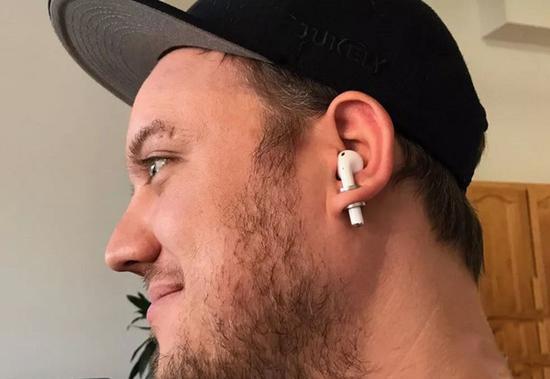

This Guy Turned Apple AirPods Into Plugs for His Gauged Ears


Cornett turned his Apple AirPods into plugs, or the cylindrical jewelry worn as stretched piercings in gauged ears. He reports they “juuust fit” in a 0 gauge: Simply insert the bottom of the device through your ear lobe (ouch) and tune in. But the smirk on his face seems to indicate the earbuds finally sound pretty good. As a bonus, his solution even solves the issue of potentially losing the small wireless devices.


We certainly do not recommend following our Twitter friend’s example. In fact, it would take two to three weeks to “responsibly” open a hole of that size in your ear. If there is one thing Cornett showed us with his Apple piercing, it is that the line between technology and our everyday lives is blurring—and that there is very little we wouldn’t do to blur it even further.


Source: dailydot


Windows
Mac OS
iOS
Linux
3uTools
Win 64-bit For this device
V9.0 2025-11-11
Download
Win 32-bit For this device
V9.0 2025-11-11
Download
3uTools
Intel Chip How to Identify Chip Type
V9.0 2025-12-02
Download
Apple Chip
V9.0 2025-12-02
Download
How to Identify Chip Type
1.  Click the Apple icon in the top-left corner of the screen and select About This Mac.
2.  Check the Processor or Chip field to determine if it is "Intel" or "Apple".
Please use the 3uTools PC client to install the iOS client:
1、 Install either the Windows or Mac version of 3uTools on your computer
2、 Open the PC client and connect your device to the computer via USB cable
3、 After the connection is successful, wait for the computer to automatically install the mobile app for the device, or locate “Install Mobile App” on the computer and manually click to install.
3uTools
deb file
V3.01 2025-11-20
Download
rpm file
V3.01 2025-11-20
Download
Windows
Windows
iOS
iOS
Android
Android
TV
TV
3uAirPlayer
Win 64-bit For this device
V6.0.2 2025-11-19
Download
Win 32-bit For this device
V6.0.2 2025-11-19
Download
iOS Device Mirroring (No App Required)
1、 Install 3uAirPlayer on the Windows PC
2、 Open Control Center and select Screen Mirroring
3、 From the list, choose your PC to start mirroring
4、 Or connect your iOS device to the PC via USB to begin mirroring
Scan to get "3uAirPlayer" App
3uAirPlayer TV V1.0.18
2025-11-28
TV System Requirements: Android 7.0 or later
Download the TV installation package, copy it to a USB drive, insert it into your TV or set-top box, then select the file from the home screen to install.




