 NEWS
NEWS
Huawei Size-Shames iPhone X Notch with Side-By-Side Comparison with its P20
 08/29/2018
 3088
3088
Huawei may have successfully bypassed Apple in the quest to become the world’s biggest smartphone maker, but that hasn’t stopped it from taking a swipe at the Cupertino giant for, you guessed it, the notch.
During a media blitz in the UK, Huawei has been using banners on which two photographs of smartphones can be seen. One of those is the Huawei P20, a solid smartphone by any measure, and the other is Apple’s iPhone X. While both devices have notches, and of course, Apple’s was the first of the pair to be released, Huawei saw fit to take a swipe at Apple’s own notch by claiming that it was simply too large.
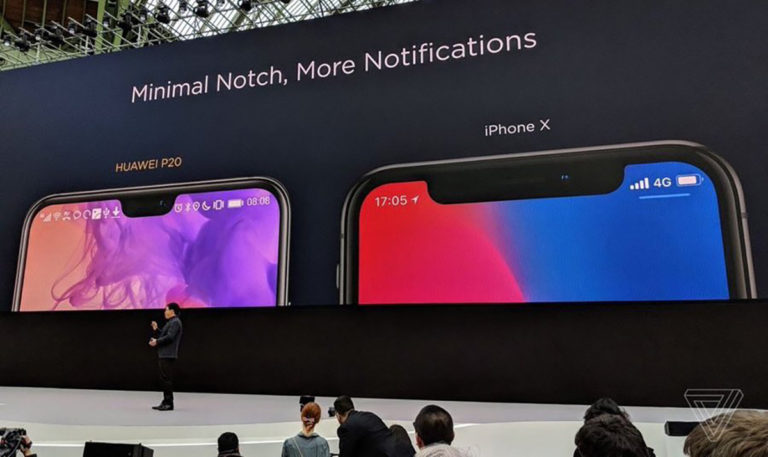
According to Huawei, the smaller notch on its P20 allows the phone to display more notifications, something that is apparently a good thing. I’d argue that more notifications is quite the opposite, but the point that the P20 has a smaller notch is indeed a valid one. It just didn’t need to be put across to potential buyers in this way and, importantly, it fails to mention that Apple’s offering features the most secure facial recognition hardware (Face ID) on the market.
When will smartphone makers stop comparing their devices to Apple’s and instead market them on their own features and benefits? Clearly, someone in Huawei’s marketing department has been speaking to someone in Samsung’s!
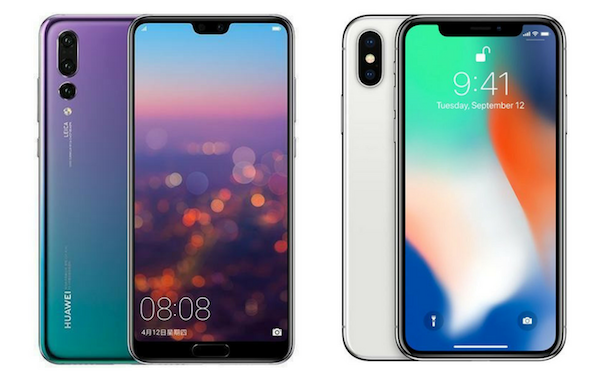
Huawei fails to mention the chin bezel at the bottom of P20, something which iPhone X doesn’t have:
At a time where Apple has recently become the first company to reach a $1 trillion market value, it’s clear the size of the iPhone’s notch is not an issue for buyers, and we’d suggest that Huawei might be better focusing on its own phones rather than Apple’s. The P20 is a great phone, why not just tell people about that instead?
Source: redmond pie










