
NEWS

Survey Finds Out Why People Switch Mobile Operating Systems

08/24/2018

2588

Usually, when someone picks a mobile operating system, they tend to stick with it. This is because switching platform usually means having to get used to a whole different system, giving up certain platform-exclusive features, and also having to purchase a bunch of apps all over again. This can get expensive if you’ve been using that platform for a long time.


However switches do happen from time to time, and companies such as Apple and Google love touting how many users hop onto their platform, as well as promoting tools to facilitate the switch. But the question is, why do people even switch in the first place? Thanks to a recent survey conducted by PCMag (via MacRumors), it has provided some interesting insights as to why.


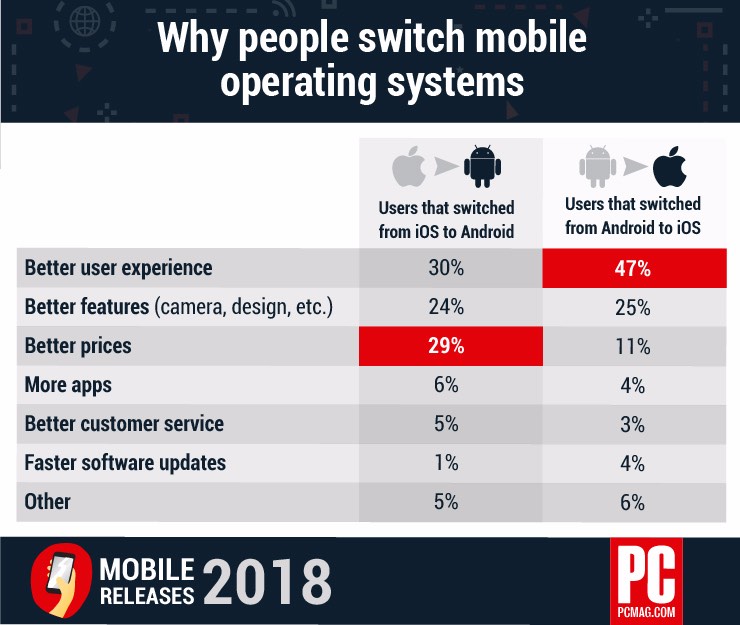
The survey was conducted with 2,500 participants and as you can see in the table above, the red portions highlighted how one of the main reasons why users from one platform hop onto another. In the case of iOS users switching to Android, it seems that price is a leading factor, which is hard to deny when you can get quality Android phones for half the price of an iPhone X.

Survey Finds Out Why People Switch Mobile Operating Systems


As for why Android users switch to iOS, it appears that a “better user experience” is an overwhelming factor. It’s interesting that other factors such as faster software updates don’t play that big a role in users switching, nor does the number of apps, but what do you guys think?


Source: ubergizmo

Windows
Mac OS
iOS
Linux
3uTools
Win 64-bit For this device
V9.0 2025-11-11
Download
Win 32-bit For this device
V9.0 2025-11-11
Download
3uTools
Intel Chip How to Identify Chip Type
V9.0 2025-12-02
Download
Apple Silicon
V9.0 2025-12-02
Download
How to Identify Chip Type
1.  Click the Apple icon in the top-left corner of the screen and select About This Mac.
2.  Check the Processor or Chip field to determine if it is "Intel" or "Apple".
Please use the 3uTools PC client to install the iOS client:
1、 Install either the Windows or Mac version of 3uTools on your computer
2、 Open the PC client and connect your device to the computer via USB cable
3、 After the connection is successful, wait for the computer to automatically install the mobile app for the device, or locate “Install Mobile App” on the computer and manually click to install.
3uTools
deb file
V3.01 2025-11-20
Download
rpm file
V3.01 2025-11-20
Download
Windows
Windows
iOS
iOS
Android
Android
TV
TV
3uAirPlayer
Win 64-bit For this device
V6.0.2 2025-11-19
Download
Win 32-bit For this device
V6.0.2 2025-11-19
Download
iOS Device Mirroring (No App Required)
1、 Install 3uAirPlayer on the Windows PC
2、 Open Control Center and select Screen Mirroring
3、 From the list, choose your PC to start mirroring
4、 Or connect your iOS device to the PC via USB to begin mirroring
Scan to get "3uAirPlayer" App
3uAirPlayer TV V1.0.18
2025-11-28
TV System Requirements: Android 7.0 or later
Download the TV installation package, copy it to a USB drive, insert it into your TV or set-top box, then select the file from the home screen to install.




