
NEWS

Apple Music for Artists Beta Now Lets You Directly Upload Artist Bio Images

08/27/2018

3190

One of the long-requested features for Apple Music by artists has been the ability to quickly and easily change bio/profile photos – the main artist image that shows up when someone searches their name on iTunes or Apple Music and also at the top of their artist/ catalogue page.


Some labels and distributors have the ability to do it via manual submission to Apple, but, unlike Spotify, Apple previously didn’t have a way for artists to do it themselves. That meant lots of independent artists simply got Apple’s default microphone icon in search and no image on their profile page. Now, Apple’s recently launched “Apple Music for Artists” beta has been updated to allow exactly that. The new feature comes alongside Apple’s refreshed and enlarged artist images that appear in iOS 12 set for release this fall.


Apple Music for Artists Beta Now Lets You Directly Upload Artist Bio Images


Here’s how it works.


The still in-beta Apple Music for Artists has a new artist image submission feature under the “Manage” tab….
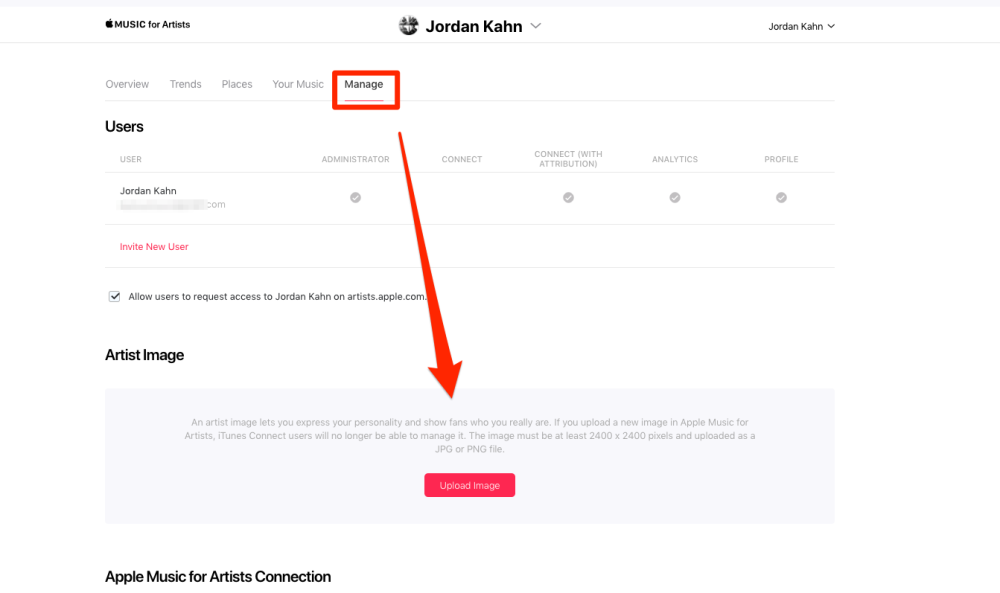

Apple Music for Artists Beta Now Lets You Directly Upload Artist Bio Images


From here artists (or anyone with permission to manage that artist’s Apple Music for Artists account) can easily submit a new artist image for review. Apple notes that the specs must be at least 2400×2400.


Apple doesn’t indicate how long on average the review process might take, but it’s nice that artists now have a way to upload their own artist images and also change them whenever they want without having to go through a third-party.


While the Apple Music for Artists beta is still limited to certain users, artists with music already on Apple Music can sign up and request access to the free service on Apple’s website today.


Source: 9to5mac


Windows
Mac OS
iOS
Linux
3uTools
Win 64-bit For this device
V9.01 2025-12-27
Download
Win 32-bit For this device
V9.01 2025-12-27
Download
3uTools
Intel Chip How to Identify Chip Type
V9.01 2025-12-31
Download
Apple Silicon
V9.01 2025-12-31
Download
How to Identify Chip Type
1.  Click the Apple icon in the top-left corner of the screen and select About This Mac.
2.  Check the Processor or Chip field to determine if it is "Intel" or "Apple".
Please use the 3uTools PC client to install the iOS client:
1、 Install either the Windows or Mac version of 3uTools on your computer
2、 Open the PC client and connect your device to the computer via USB cable
3、 After the connection is successful, wait for the computer to automatically install the mobile app for the device, or locate “Install Mobile App” on the computer and manually click to install.
3uTools
deb file
V3.01 2025-11-20
Download
rpm file
V3.01 2025-11-20
Download
Windows
Windows
iOS
iOS
Android
Android
TV
TV
3uAirPlayer
Win 64-bit For this device
V6.0.2 2025-11-19
Download
Win 32-bit For this device
V6.0.2 2025-11-19
Download
iOS Device Mirroring (No App Required)
1、 Install 3uAirPlayer on the Windows PC
2、 Open Control Center and select Screen Mirroring
3、 From the list, choose your PC to start mirroring
4、 Or connect your iOS device to the PC via USB to begin mirroring
Scan to get "3uAirPlayer" App
3uAirPlayer TV V1.0.18
2025-11-28
TV System Requirements: Android 7.0 or later
Download the TV installation package, copy it to a USB drive, insert it into your TV or set-top box, then select the file from the home screen to install.




