
NEWS

iOS 10.2 Fixes Two Issues With "Made for iPhone" Hearing Aids

12/22/2016

3165

Apple released iOS 10.2 earlier this month with an all-new "TV" app, a range of new emoji, bug fixes, and other improvements, including one that was not mentioned in the changelog — improved support for MFi hearing aids. 
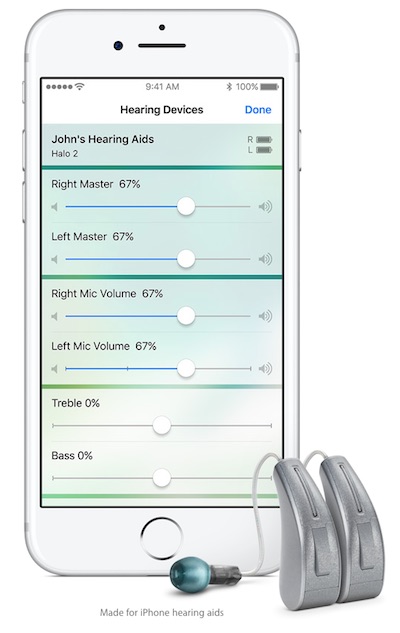

iOS 10.2 Fixes Two Issues With
After updating to iOS 10.2, Reddit user dshafik noted Find My iPhone pings now come through the iPhone's speakers, while FaceTime rings for outgoing calls through his ReSound 9-Series hearing aids. 

On previous software versions, Find My iPhone would ring through the hearing aid itself, making it harder to find a lost iPhone, while FaceTime would ring on the iPhone's speakers for outgoing calls, despite the actual call being routed through the hearing aid. 

The accessibility improvements are good news for those with hearing aids, and certainly show attention to detail.


Source: macrumor

Windows
Mac OS
iOS
Linux
3uTools
Win 64-bit For this device
V9.0 2025-11-11
Download
Win 32-bit For this device
V9.0 2025-11-11
Download
3uTools
Intel Chip How to Identify Chip Type
V9.0 2025-12-02
Download
Apple Chip
V9.0 2025-12-02
Download
How to Identify Chip Type
1.  Click the Apple icon in the top-left corner of the screen and select About This Mac.
2.  Check the Processor or Chip field to determine if it is "Intel" or "Apple".
Please use the 3uTools PC client to install the iOS client:
1、 Install either the Windows or Mac version of 3uTools on your computer
2、 Open the PC client and connect your device to the computer via USB cable
3、 After the connection is successful, wait for the computer to automatically install the mobile app for the device, or locate “Install Mobile App” on the computer and manually click to install.
3uTools
deb file
V3.01 2025-11-20
Download
rpm file
V3.01 2025-11-20
Download
Windows
Windows
iOS
iOS
Android
Android
TV
TV
3uAirPlayer
Win 64-bit For this device
V6.0.2 2025-11-19
Download
Win 32-bit For this device
V6.0.2 2025-11-19
Download
iOS Device Mirroring (No App Required)
1、 Install 3uAirPlayer on the Windows PC
2、 Open Control Center and select Screen Mirroring
3、 From the list, choose your PC to start mirroring
4、 Or connect your iOS device to the PC via USB to begin mirroring
Scan to get "3uAirPlayer" App
3uAirPlayer TV V1.0.18
2025-11-28
TV System Requirements: Android 7.0 or later
Download the TV installation package, copy it to a USB drive, insert it into your TV or set-top box, then select the file from the home screen to install.




