
NEWS

New Patents Refer to Apple Pencil Working With iPhone

12/16/2016

3471

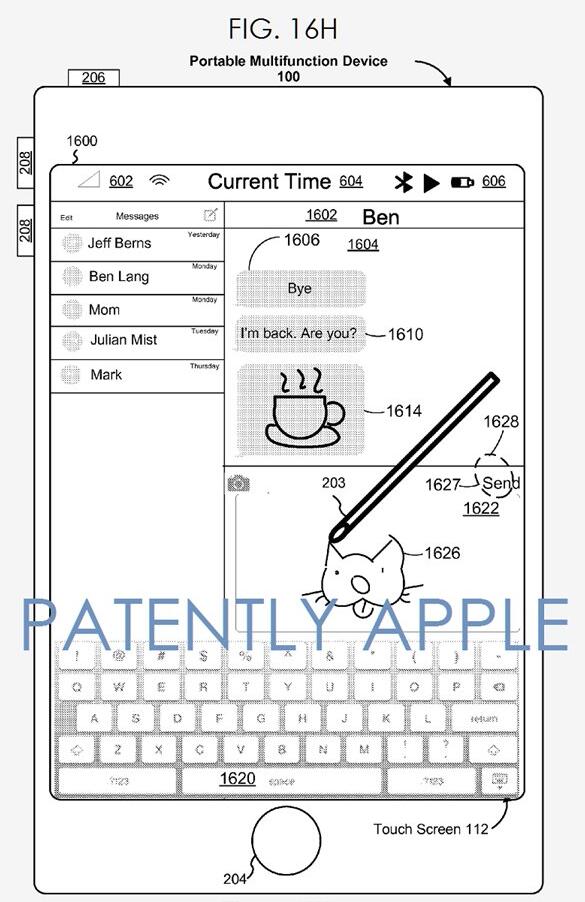
A series of new patents spotted by Patently Apple refer to the Apple Pencil working with an iPhone, as well as illustrating it being used with additional stock iOS apps like iMovie.


A comment by Tim Cook back in September seemed to suggest that Apple is already testing the Apple Pencil with an iPhone...If you’ve ever seen what can be created with that pencil on an iPad or an iPhone, it’s really unbelievable.


A poll of more than 10,000 9to5Mac readers found that a third of you definitely wanted to use the Apple Pencil with an iPhone. Apple has also been granted a patent for use of the Apple Pencil with a AMc trackpad.

New Patents Refer to Apple Pencil Working With iPhone


An early report also suggested that Apple was testing use of the Apple Pencil in a range of stock apps on the iPad, including Mail, Messages and Safari. The patents include use in Messages, and also appear to show it being used for video editing in iMovie.


We throw in our usual disclaimer that Apple patents way more things that it ever launches, but given the evidence in this case, support for both the iPhone and a wider range of stock apps on the iPad would seem to be more likely than not.


Source: 9to5mac 


Windows
Mac OS
iOS
Linux
3uTools
Win 64-bit For this device
V9.0 2025-11-11
Download
Win 32-bit For this device
V9.0 2025-11-11
Download
3uTools
Intel Chip How to Identify Chip Type
V9.0 2025-12-02
Download
Apple Chip
V9.0 2025-12-02
Download
How to Identify Chip Type
1.  Click the Apple icon in the top-left corner of the screen and select About This Mac.
2.  Check the Processor or Chip field to determine if it is "Intel" or "Apple".
Please use the 3uTools PC client to install the iOS client:
1、 Install either the Windows or Mac version of 3uTools on your computer
2、 Open the PC client and connect your device to the computer via USB cable
3、 After the connection is successful, wait for the computer to automatically install the mobile app for the device, or locate “Install Mobile App” on the computer and manually click to install.
3uTools
deb file
V3.01 2025-11-20
Download
rpm file
V3.01 2025-11-20
Download
Windows
Windows
iOS
iOS
Android
Android
TV
TV
3uAirPlayer
Win 64-bit For this device
V6.0.2 2025-11-19
Download
Win 32-bit For this device
V6.0.2 2025-11-19
Download
iOS Device Mirroring (No App Required)
1、 Install 3uAirPlayer on the Windows PC
2、 Open Control Center and select Screen Mirroring
3、 From the list, choose your PC to start mirroring
4、 Or connect your iOS device to the PC via USB to begin mirroring
Scan to get "3uAirPlayer" App
3uAirPlayer TV V1.0.18
2025-11-28
TV System Requirements: Android 7.0 or later
Download the TV installation package, copy it to a USB drive, insert it into your TV or set-top box, then select the file from the home screen to install.




