 NEWS
NEWS
Apple Found to be 12th Most Reputable Brand in China
 05/18/2018
 3260
3260
A new survey today aims to show the most reputable companies in the eyes of customers in China. As noted by the South China Morning Post, The Reputation Institute today released its China RepTrak rankings, breaking down brand reputation in China…
According to the rankings, Apple is the 12th most reputable company in China. That puts it behind several other technology companies, including Intel at first place, Huawei at second, Google at fourth, Nokia at eighth, and Microsoft at eleventh.
To gather its information, The Reputation Institute polled 30,000 Chinese consumers, who were asked to rate the companies based on trust, esteem, admiration, and good feeling. The average of those ratings are what formed each company’s score.
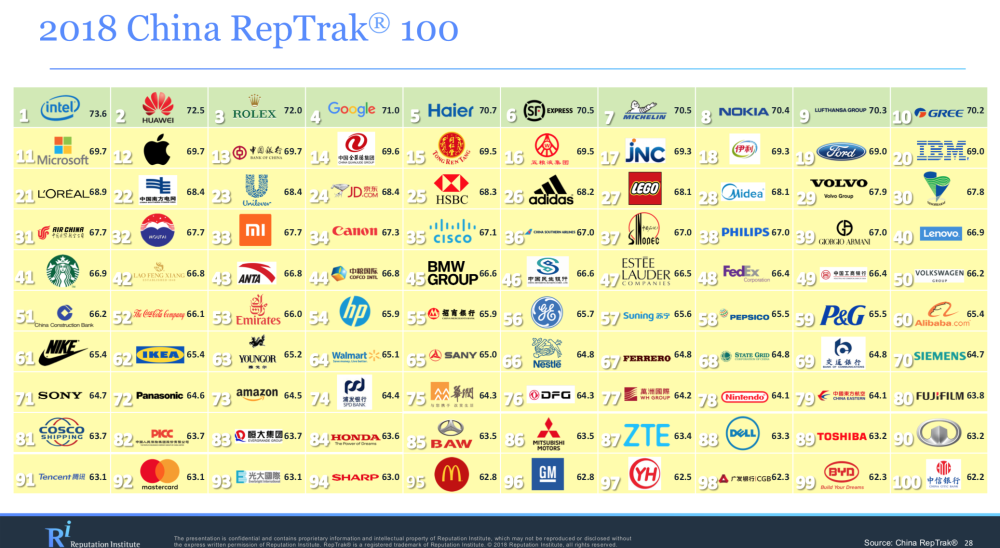
Overall, Apple received a score of 69.7, compared to Huawei’s 72.5. Chinese customers view Huawei as “2x more genuine” than Apple, according to the survey. Furthermore, Huawei outperforms in terms of transparency and open commutation, as well as “standing out from the crowd.”
Interestingly, Foxconn was given an average rating fo 67.6, with Apple leading in all individual categories aside from “governance.” The Reputation Institute notes that Apple’s reputation as slipped 8.7 points since 2012, which is when light was shed onto harsh working conditions in Apple’s supply chain.
All in all, both Apple and Foxconn were awarded ‘average’ ratings for their reputation in China. Surveys like this should generally be taken with a grain of salt, but they can show some interesting data points. One of Apple’s biggest competitors in China is Huawei, so it’s certainly interesting to Huawei viewed as more reputable in the country.
China continues to be a heavy focus for Apple, with the company continuing to report growth in the region. During its most recent earnings call, Apple touted 21 percent year-over-year growth in China, pushing the size of its China business to be as big a market as Europe.
Source: 9to5mac










