 NEWS
NEWS
WatchOS 3.1.1 Bricking Some Apple Watch Series 2 Models
 12/14/2016
 3866
3866
Following the release of watchOS 3.1.1 yesterday afternoon, a few early-installers of the latest operating system for the Apple Watch have found that their devices become bricked during the update process. Users in the MacRumors forums, email tipsters, and quite a few Redditors have begun reporting a red exclamation mark on their Apple Watch's screen that guides them to www.apple.com/help/watch.
Most have discovered they now need to send the device back to Apple so it can be replaced because Apple retail locations can't service the problem in-store. To fix the issue, the Apple Watch has to be restored through the device's small diagnostic port, which Apple Storesdon't cover.
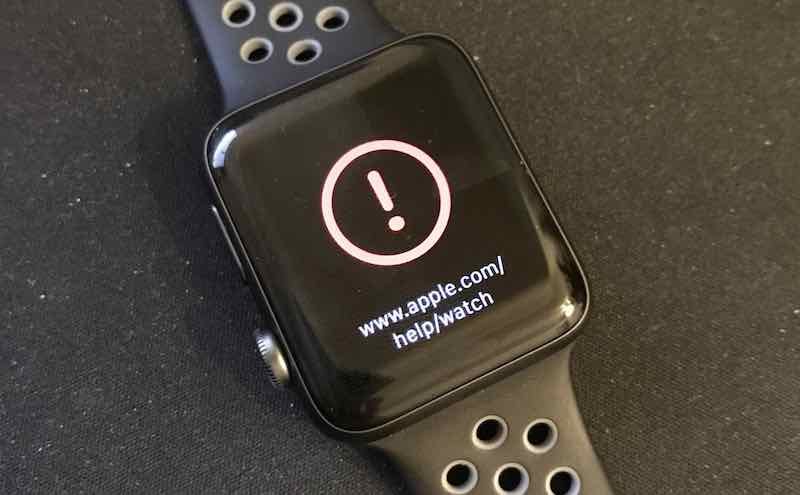
The majority of users appear to be using an Apple Watch Series 2, and issues first began with reports of the watchOS 3.1.1 update getting stuck on the circular progress bar. A few bricking cases appear to be because some users were force-restarting the Apple Watch during the update process because of the progress bar being stuck in one place for upwards of a few hours. However, most cases appear to lack a specific reason as to why the Apple Watch bricked during the update, with those users reporting not having touched or interacted with the device while it was charging and updating.
Now, users affected by bricked Apple Watches can either visit an Apple Store so the location can ship off the device to be replaced by a new Apple Watch, or they can visit Apple's support site to begin the exchange process and ship it off themselves. The Series 0 and Series 1 Apple Watches appear to have gotten through the watchOS 3.1.1 update with less of a hassle, although some admitted the update did "take a long time" and needed to be installed twice in one case.
Apple has yet to address the watchOS 3.1.1 bricking issue, but it should be noted that there are also plenty of Series 2 owners who have made it out the other side of the update without any problems. Still, if you're concerned about a potential bricked Apple Watch, it appears that the best course of action is to stay on a version of watchOS of 3.1 or below for the time being. Yesterday, Apple also released iOS 10.2 and tvOS 10.1, both introducing the all-new TV app to users.
Source: MacRumors










