
NEWS

Apple Updates Photos App on iCloud

12/06/2016

3594

Today Apple has updated its iCloud Photos web app with some new navigation improvements. The Photos web app lets users access their iCloud Photo Library through the web on a Mac or Windows computer.


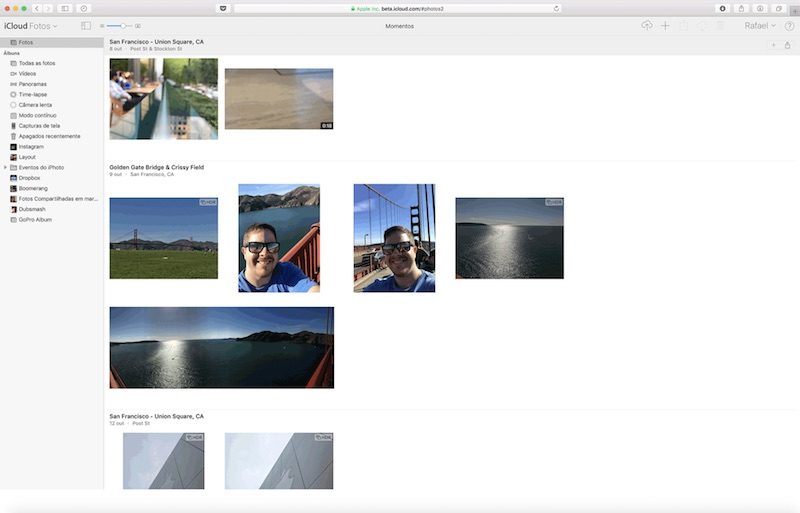
Launched in a beta state, the new Photos app features a sidebar and thumbnail scrubber like its native counterpart on the Mac. This feature should be rolling out to all users soon as Apple uses its beta site to test features before they rollout to everyone.

Apple Updates Photos App on iCloud


The new app also allows users to upload and download photos, while the sidebar adds a list of albums the user has in their library. The sidebar can be hidden away at any time. In addition, you can now have a persistent scrubber of images that shows photos taken before and after the current photo, which has also been borrowed from the native Photos app on the Mac.


Updates to iCloud.com are far and few between… While it’s good they’re updating it, the interface is pretty bad. The web interface will need more, however, if Apple expects people to actually use it on a regular basis.


Source: todaysiPhone


Windows
Mac OS
iOS
Linux
3uTools
Win 64-bit For this device
V9.0 2025-11-11
Download
Win 32-bit For this device
V9.0 2025-11-11
Download
3uTools
Intel Chip How to Identify Chip Type
V9.0 2025-12-02
Download
Apple Chip
V9.0 2025-12-02
Download
How to Identify Chip Type
1.  Click the Apple icon in the top-left corner of the screen and select About This Mac.
2.  Check the Processor or Chip field to determine if it is "Intel" or "Apple".
Please use the 3uTools PC client to install the iOS client:
1、 Install either the Windows or Mac version of 3uTools on your computer
2、 Open the PC client and connect your device to the computer via USB cable
3、 After the connection is successful, wait for the computer to automatically install the mobile app for the device, or locate “Install Mobile App” on the computer and manually click to install.
3uTools
deb file
V3.01 2025-11-20
Download
rpm file
V3.01 2025-11-20
Download
Windows
Windows
iOS
iOS
Android
Android
TV
TV
3uAirPlayer
Win 64-bit For this device
V6.0.2 2025-11-19
Download
Win 32-bit For this device
V6.0.2 2025-11-19
Download
iOS Device Mirroring (No App Required)
1、 Install 3uAirPlayer on the Windows PC
2、 Open Control Center and select Screen Mirroring
3、 From the list, choose your PC to start mirroring
4、 Or connect your iOS device to the PC via USB to begin mirroring
Scan to get "3uAirPlayer" App
3uAirPlayer TV V1.0.18
2025-11-28
TV System Requirements: Android 7.0 or later
Download the TV installation package, copy it to a USB drive, insert it into your TV or set-top box, then select the file from the home screen to install.




