NEWS

The Leagoo S9 Shamelessly Adopts the iPhone X’s Design

12/13/2017

2858

The Leagoo S9 Shamelessly Adopts the iPhone X’s Design


Apple introduced the iPhone X earlier this year, and, at the time, welcomed “the notch,” which equipped the front-facing TrueDepth camera system to facilitate things like Animoji and the arrival of the new biometric security measure Face ID.


The notch design is not only a means to support these new features, but also something that makes the iPhone X stand out. It is very distinct in its design. So when another company that isn’t Apple uses the same design cue, it more or less really stands out for all the wrong reasons. But that reality was ultimately inevitable, because some companies like to copy Apple in any way that they can.


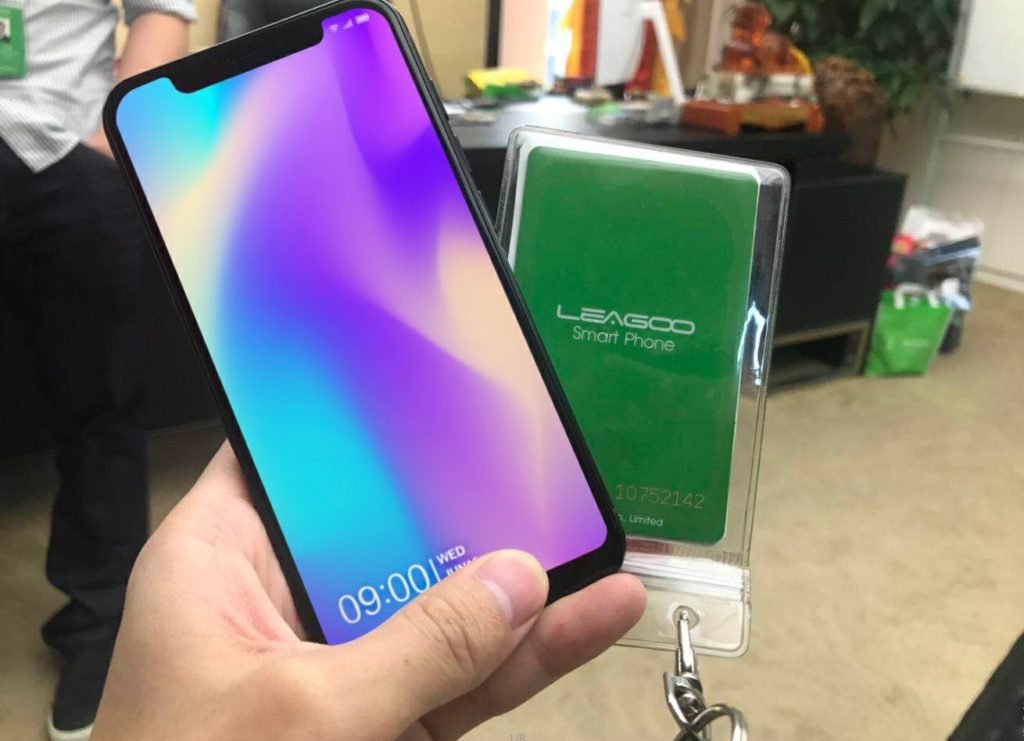
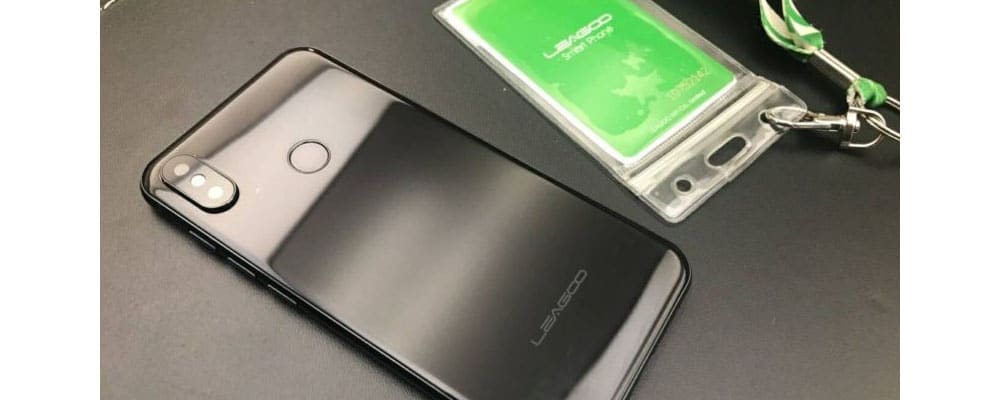
The Chinese smartphone company Leagoo is one such company, apparently. Android Headlines got their hands on some leaked photos of the upcoming smartphone, which, as you can see for yourself, shamelessly adopts the iPhone X design. Both on the back of the handset and, yes, even the notch design on the front.

The Leagoo S9 Shamelessly Adopts the iPhone X’s Design


Unfortunately, the photos did not accompany information about specifications, but it’s likely that the Leagoo S9 is going to be a mid-range handset. The idea for most of these devices is that potential buyers might want the iPhone X, with that familiar design, but doesn’t want to spend the money Apple is requesting to get it.


And hey, the Leagoo S9 has a fingerprint scanner on the back. So there’s that.


Source: iphonehacks

Windows
Mac OS
iOS
Linux
3uTools
Win 64-bit For this device
V9.01 2025-12-27
Download
Win 32-bit For this device
V9.01 2025-12-27
Download
3uTools
Intel Chip How to Identify Chip Type
V9.01 2025-12-31
Download
Apple Silicon
V9.01 2025-12-31
Download
How to Identify Chip Type
1.  Click the Apple icon in the top-left corner of the screen and select About This Mac.
2.  Check the Processor or Chip field to determine if it is "Intel" or "Apple".
Please use the 3uTools PC client to install the iOS client:
1、 Install either the Windows or Mac version of 3uTools on your computer
2、 Open the PC client and connect your device to the computer via USB cable
3、 After the connection is successful, wait for the computer to automatically install the mobile app for the device, or locate “Install Mobile App” on the computer and manually click to install.
3uTools
deb file
V3.01 2025-11-20
Download
rpm file
V3.01 2025-11-20
Download
Windows
Windows
iOS
iOS
Android
Android
TV
TV
3uAirPlayer
Win 64-bit For this device
V6.0.2 2025-11-19
Download
Win 32-bit For this device
V6.0.2 2025-11-19
Download
iOS Device Mirroring (No App Required)
1、 Install 3uAirPlayer on the Windows PC
2、 Open Control Center and select Screen Mirroring
3、 From the list, choose your PC to start mirroring
4、 Or connect your iOS device to the PC via USB to begin mirroring
Scan to get "3uAirPlayer" App
3uAirPlayer TV V1.0.18
2025-11-28
TV System Requirements: Android 7.0 or later
Download the TV installation package, copy it to a USB drive, insert it into your TV or set-top box, then select the file from the home screen to install.