
NEWS

Apple Redesigns Support app for iPhone & iPad With 'Discover' Tab

11/30/2017

2597

Apple has released a major update of its Support app for iOS, making significant improvements to the user interface.
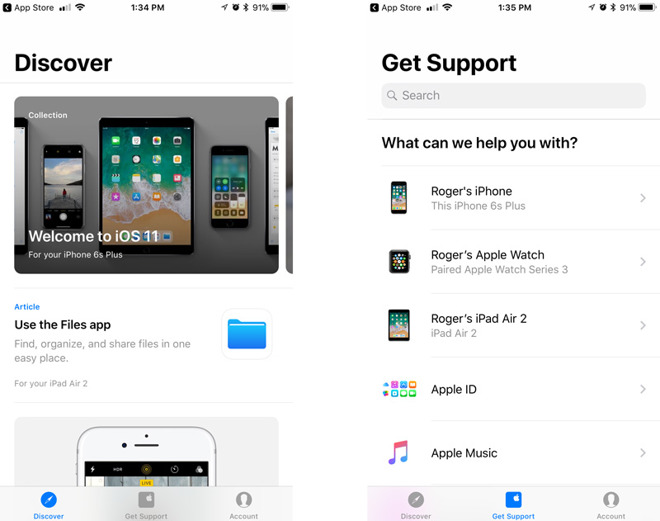

Apple Redesigns Support app for iPhone & iPad With 'Discover' Tab


The biggest addition is a "Discover" tab, which highlights articles related to the devices a person owns. A person with an iPhone, iPad, and Apple Watch tied to the same Apple ID may for instance see guides for the iOS 11 Control Center, the Files app, and starting a workout in watchOS 4.


Some of the items under Discover are "Collections," gathering together information on a broad subject.


The app as a whole now uses more white space, and includes a search bar at the top of a default "Get Support" tab. Tapping on a product will show articles broken up into "Popular Topics" and "More Topics."


Apple Support is a free download, and runs on any device with iOS 11 or later.


Source: appleinsider

Windows
Mac OS
iOS
Linux
3uTools
Win 64-bit For this device
V9.01 2025-12-27
Download
Win 32-bit For this device
V9.01 2025-12-27
Download
3uTools
Intel Chip How to Identify Chip Type
V9.01 2025-12-31
Download
Apple Silicon
V9.01 2025-12-31
Download
How to Identify Chip Type
1.  Click the Apple icon in the top-left corner of the screen and select About This Mac.
2.  Check the Processor or Chip field to determine if it is "Intel" or "Apple".
Please use the 3uTools PC client to install the iOS client:
1、 Install either the Windows or Mac version of 3uTools on your computer
2、 Open the PC client and connect your device to the computer via USB cable
3、 After the connection is successful, wait for the computer to automatically install the mobile app for the device, or locate “Install Mobile App” on the computer and manually click to install.
3uTools
deb file
V3.01 2025-11-20
Download
rpm file
V3.01 2025-11-20
Download
Windows
Windows
iOS
iOS
Android
Android
TV
TV
3uAirPlayer
Win 64-bit For this device
V6.0.2 2025-11-19
Download
Win 32-bit For this device
V6.0.2 2025-11-19
Download
iOS Device Mirroring (No App Required)
1、 Install 3uAirPlayer on the Windows PC
2、 Open Control Center and select Screen Mirroring
3、 From the list, choose your PC to start mirroring
4、 Or connect your iOS device to the PC via USB to begin mirroring
Scan to get "3uAirPlayer" App
3uAirPlayer TV V1.0.18
2025-11-28
TV System Requirements: Android 7.0 or later
Download the TV installation package, copy it to a USB drive, insert it into your TV or set-top box, then select the file from the home screen to install.




