 NEWS
NEWS
iOS 11 Installed on Almost 55% of Devices One Month After Launch
 10/20/2017
 3620
3620
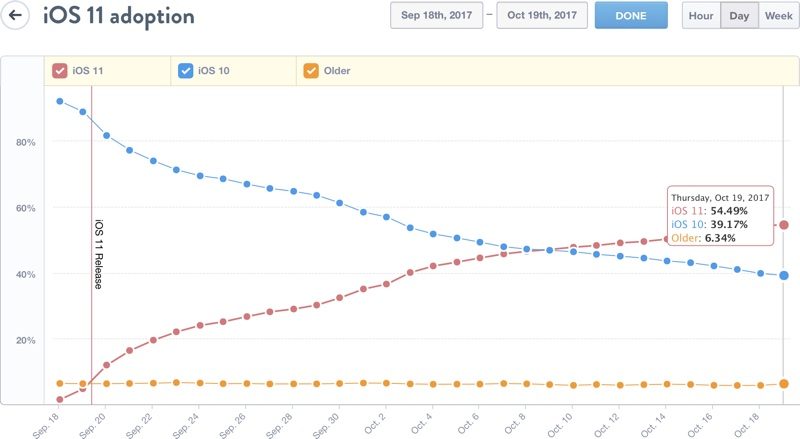
One month after its official public release, iOS 11 has been installed on 54.49 percent of devices.
iOS 11 was first released on September 19, and while adoption has been rather slow compared to iOS 10 adoption, it is steadily picking up. At the one week mark, iOS 11 was installed on 25 percent of devices, and at two weeks, installation climbed to 38.5 percent of devices.
At three weeks, iOS 11 adoption reached 47 percent, successfully overtaking iOS 10, and the gap between the two operating systems has continued to widen. With iOS 11 on nearly 55 percent of devices, iOS 10 is now installed on just 39.17 percent of devices. 6.34 percent of devices continue to run an older version of iOS.
Apple has released three minor updates to iOS 11 so far to address bugs and issues discovered since the launch of the new operating system. The most recent update, iOS 11.0.3, fixed an issue with haptic feedback and unresponsive displays, while iOS 11.0.2 addressed an irritating problem that caused the iPhone 8 and 8 Plus earpiece to crackleon phone calls.
iOS 11 adoption is likely to increase significantly when iOS 11.1 is released, if past iOS launches are any indication. Major .1 releases often spur people to update, and iOS 11.1 introduces new emojis and may include Apple Pay Cash, Apple's peer-to-peer Apple Pay feature. In past years, new emoji have had a noticeable impact on upgrade rates.
The iOS 11.1 update also fixes some lingering bugs, including one that caused Reachability to work improperly, and it addresses a serious WPA2 Wi-Fi vulnerability. It's not yet clear when Apple plans to release iOS 11.1, but there have been three betas thus far.
Source: macrumor










