
NEWS

Square Checkout Now Works With Apple Pay on the Web

09/28/2017

2433

Square is enabling support for Apple Pay on the web for all Square Checkout sellers, and support won’t require any update or code change.
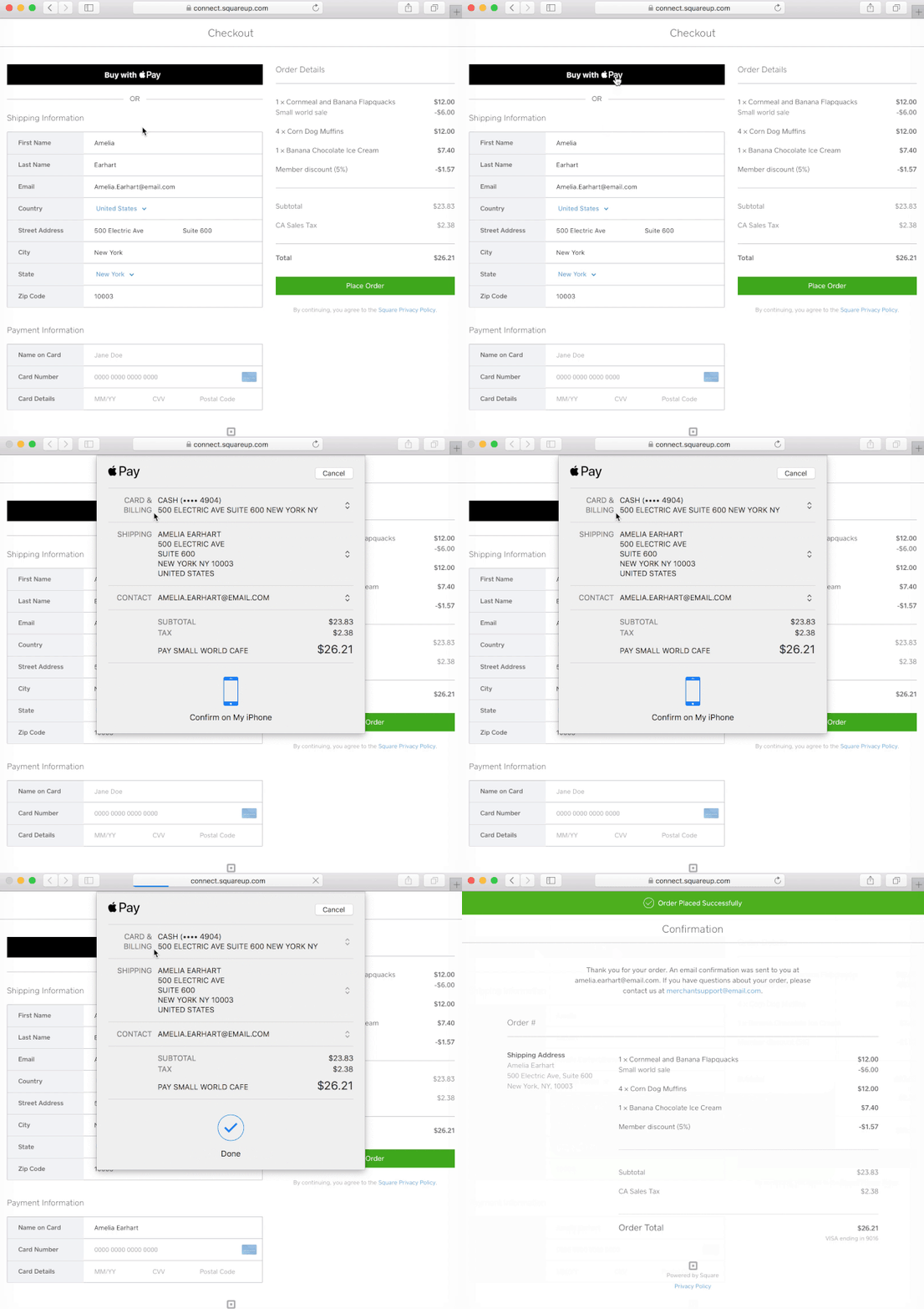


Square Checkout Now Works With Apple Pay on the Web

Apple Pay on the web allows shoppers to make online transactions securely and conveniently on supported iPhones, iPads, and Macs. Apple Pay on the web works with Safari and is a huge improvement to manually entering credit card and billing information in web forms online.


Square is also supporting Apple Pay on the web through its e-commerce API. A simple code tweak detailed here enables Apple Pay on the web support for e-commerce API users. Square says some sellers testing Apple Pay on the web have been able “double their checkout conversion rates and reduce checkout time and drop off rates.”


The company also supports small businesses with Apple Pay in stores with the Square Contactless card reader.


Source: 9to5mac

Windows
Mac OS
iOS
Linux
3uTools
Win 64-bit For this device
V9.01 2025-12-27
Download
Win 32-bit For this device
V9.01 2025-12-27
Download
3uTools
Intel Chip How to Identify Chip Type
V9.0 2025-12-02
Download
Apple Silicon
V9.0 2025-12-02
Download
How to Identify Chip Type
1.  Click the Apple icon in the top-left corner of the screen and select About This Mac.
2.  Check the Processor or Chip field to determine if it is "Intel" or "Apple".
Please use the 3uTools PC client to install the iOS client:
1、 Install either the Windows or Mac version of 3uTools on your computer
2、 Open the PC client and connect your device to the computer via USB cable
3、 After the connection is successful, wait for the computer to automatically install the mobile app for the device, or locate “Install Mobile App” on the computer and manually click to install.
3uTools
deb file
V3.01 2025-11-20
Download
rpm file
V3.01 2025-11-20
Download
Windows
Windows
iOS
iOS
Android
Android
TV
TV
3uAirPlayer
Win 64-bit For this device
V6.0.2 2025-11-19
Download
Win 32-bit For this device
V6.0.2 2025-11-19
Download
iOS Device Mirroring (No App Required)
1、 Install 3uAirPlayer on the Windows PC
2、 Open Control Center and select Screen Mirroring
3、 From the list, choose your PC to start mirroring
4、 Or connect your iOS device to the PC via USB to begin mirroring
Scan to get "3uAirPlayer" App
3uAirPlayer TV V1.0.18
2025-11-28
TV System Requirements: Android 7.0 or later
Download the TV installation package, copy it to a USB drive, insert it into your TV or set-top box, then select the file from the home screen to install.




