
NEWS

LINE FRIENDS x Beats by Dre Headphone Is Cuteness Overload

07/31/2017

3202

You don’t have to be a LINE user to appreciate the app’s latest collaborative headphone with Beats by Dre. Inspired by the beloved LINE FRIENDS character Brown, this beary rework of the Solo3 Wireless on-ear headphone is too cute to handle.


Compatible with both iOS and Android devices, the handy, foldable headphone features Class 1 Bluetooth and is even equipped with a 40-hour battery life. More than that, it even comes with a matching carrying case featuring the adorable face of Brown. Take a closer look at the gadget above.
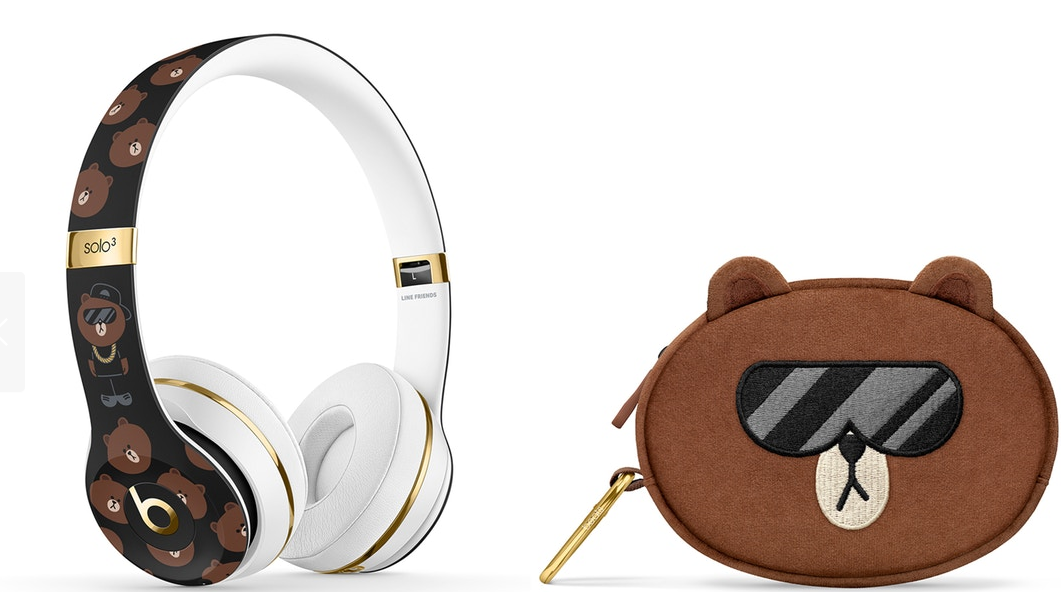

 LINE FRIENDS x Beats by Dre Headphone Is Cuteness Overload


Priced at $2,288 HKD (approximately $293 USD), you can expect to shop this limited-edition headphone at apple.com beginning August 3. The collaboration will also hit LINE FRIENDS retail stores worldwide on August 17.


Source: hypebea

Windows
Mac OS
iOS
Linux
3uTools
Win 64-bit For this device
V9.0 2025-11-11
Download
Win 32-bit For this device
V9.0 2025-11-11
Download
3uTools
Intel Chip How to Identify Chip Type
V9.0 2025-12-02
Download
Apple Silicon
V9.0 2025-12-02
Download
How to Identify Chip Type
1.  Click the Apple icon in the top-left corner of the screen and select About This Mac.
2.  Check the Processor or Chip field to determine if it is "Intel" or "Apple".
Please use the 3uTools PC client to install the iOS client:
1、 Install either the Windows or Mac version of 3uTools on your computer
2、 Open the PC client and connect your device to the computer via USB cable
3、 After the connection is successful, wait for the computer to automatically install the mobile app for the device, or locate “Install Mobile App” on the computer and manually click to install.
3uTools
deb file
V3.01 2025-11-20
Download
rpm file
V3.01 2025-11-20
Download
Windows
Windows
iOS
iOS
Android
Android
TV
TV
3uAirPlayer
Win 64-bit For this device
V6.0.2 2025-11-19
Download
Win 32-bit For this device
V6.0.2 2025-11-19
Download
iOS Device Mirroring (No App Required)
1、 Install 3uAirPlayer on the Windows PC
2、 Open Control Center and select Screen Mirroring
3、 From the list, choose your PC to start mirroring
4、 Or connect your iOS device to the PC via USB to begin mirroring
Scan to get "3uAirPlayer" App
3uAirPlayer TV V1.0.18
2025-11-28
TV System Requirements: Android 7.0 or later
Download the TV installation package, copy it to a USB drive, insert it into your TV or set-top box, then select the file from the home screen to install.




