 NEWS
NEWS
Latest iPhone 8 Renders Imagine a Seamless Status Bar
 07/25/2017
 3298
3298
While the rumored iPhone 8 is expected to introduce a new edge-to-edge display, a notch-like section is expected to surround the speaker and camera sensors along the top front. New iPhone 8 renders published by Forbes show how iOS could use this space to seamlessly integrate the status bar…
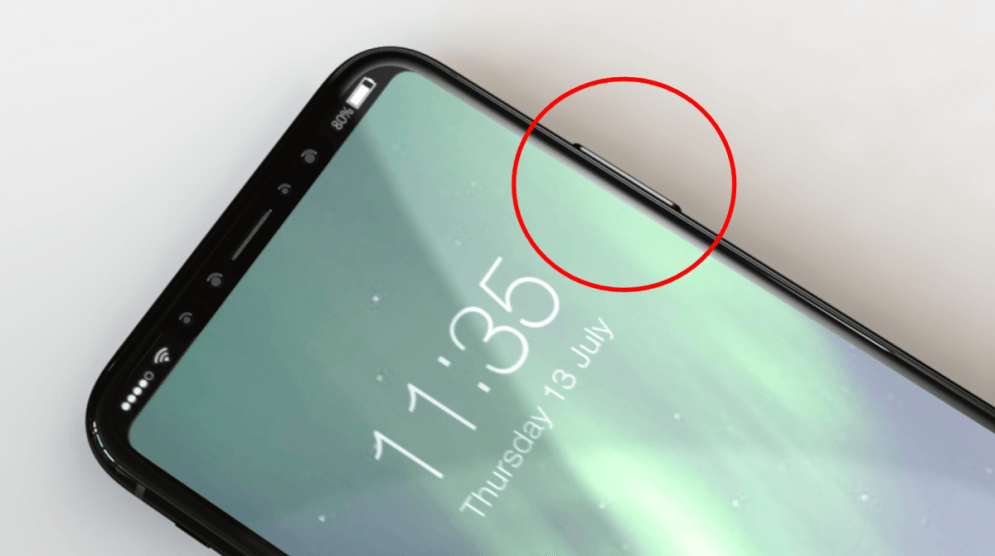
Forbes contributor Gordon Kelly cites supply chain sources through case maker Nodus in specifically claiming the bezel around the 5.8-inch display will measure 4mm on each side. Kelly predicts what others have previously about the status bar integrating around the top notch area:
What also remains uncertain is how Apple will redesign iOS 11 to accommodate the ‘cutout’ at the top of the display which exists to accommodate the front facing camera and sensors.
What Nodus and I believe is the remaining corners will simply be used for connectivity and battery status with notifications switched to the bottom in a new easier-to-reach and more detailed ‘Function Area’.
While there’s no new reporting here, the accompanied renders certainly show how the iPhone 8 could pull off the top notch area without being an eye-sore.
Kelly and Nodus are as unsure about how Touch ID will be integrated (in-display, rear, not at all?), but they’re confident the power switch on the right side will be taller and predict that could be for Touch ID’s function.
Earlier this month, however, it was reported that Apple is considering replacing Touch ID completely with facial recognition features. The idea seems to be that the dramatically reduced bezel cannot support the current Touch ID sensor and integrating the sensor in the screen at scale isn’t possible yet.
While the status bar integration is a clever workaround to the distracting notch on the otherwise bezel-less design, it’s unclear how the clock on the Home screen could be displayed and how the software bezel would appear in landscape orientation.
Source: 9to5mac










