NEWS

Facebook Brings GIF Creation to its iPhone App

07/17/2017

2483

Facebook Brings GIF Creation to its iPhone App


Facebook has quietly added the ability to make, save, and share GIFs using the built-in camera in its iOS app.


The feature is the latest camera-related upgrade Facebook has added in its efforts to take on socially-oriented, photo and video-sharing apps like Snapchat. Facebook added its mobile camera earlier this year, alongside an assortment of frames and reactive filters.


When it introduced the feature, Facebook said that it would be constantly refreshing the creative effects in its camera to keep it fun and fresh. Recently, it started supporting GIFs in the comments section of posts.


How to GIF

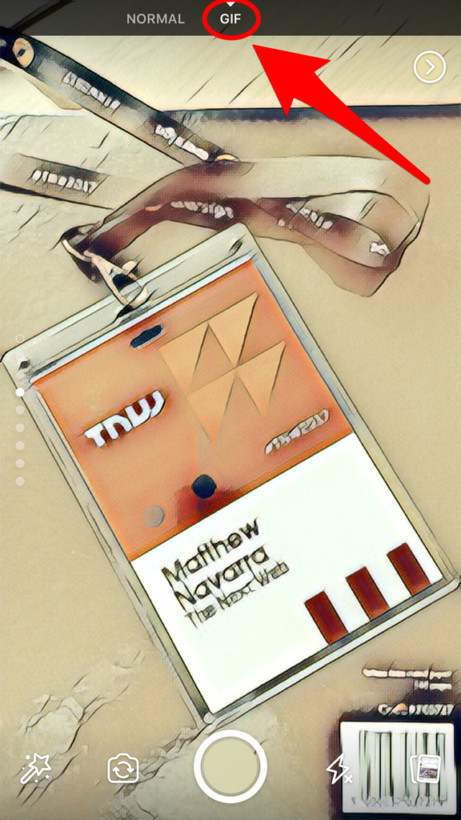
To access the camera, and the new GIF-making tool, swipe left while using the Facebook app. At the top of the screen — as seen in the image above — you get “Normal” and “GIF” options. To record a GIF, tap that option and then start recording.


You get around 3.5 seconds to create your GIF, after which it will begin looping. You then have the option of adding additional effects, saving it to your device, incorporating it into the “Your Story” feature, or sharing it with friends.


At present, the feature appears to only be accessible to iOS users, which means your Android-using friends (seriously, ditch ’em!) may be waiting a while until they can make use of GIFs themselves.


Source: cult of mac

Windows
Mac OS
iOS
Linux
3uTools
Win 64-bit For this device
V9.0 2025-11-11
Download
Win 32-bit For this device
V9.0 2025-11-11
Download
3uTools
Intel Chip How to Identify Chip Type
V9.0 2025-12-02
Download
Apple Silicon
V9.0 2025-12-02
Download
How to Identify Chip Type
1.  Click the Apple icon in the top-left corner of the screen and select About This Mac.
2.  Check the Processor or Chip field to determine if it is "Intel" or "Apple".
Please use the 3uTools PC client to install the iOS client:
1、 Install either the Windows or Mac version of 3uTools on your computer
2、 Open the PC client and connect your device to the computer via USB cable
3、 After the connection is successful, wait for the computer to automatically install the mobile app for the device, or locate “Install Mobile App” on the computer and manually click to install.
3uTools
deb file
V3.01 2025-11-20
Download
rpm file
V3.01 2025-11-20
Download
Windows
Windows
iOS
iOS
Android
Android
TV
TV
3uAirPlayer
Win 64-bit For this device
V6.0.2 2025-11-19
Download
Win 32-bit For this device
V6.0.2 2025-11-19
Download
iOS Device Mirroring (No App Required)
1、 Install 3uAirPlayer on the Windows PC
2、 Open Control Center and select Screen Mirroring
3、 From the list, choose your PC to start mirroring
4、 Or connect your iOS device to the PC via USB to begin mirroring
Scan to get "3uAirPlayer" App
3uAirPlayer TV V1.0.18
2025-11-28
TV System Requirements: Android 7.0 or later
Download the TV installation package, copy it to a USB drive, insert it into your TV or set-top box, then select the file from the home screen to install.