 NEWS
NEWS
Apple Maps Transit Directions Now Available in Las Vegas and Western Nevada
 07/11/2017
 3491
3491
Apple Maps has been updated with comprehensive transit data in several higher populated areas of Nevada, enabling iPhone users to navigate with public transportation directions throughout the Silver State.
Newly supported areas include Las Vegas, including the nearby cities of North Las Vegas and Henderson, as well as the state capital Carson City and the Reno-Sparks metropolitan area in Western Nevada.
In Las Vegas, Apple Maps can provide directions for the Las Vegas Monorail and RTC Transit buses, including The Deuce and The SDX operating in and between the Las Vegas Strip and Downtown Las Vegas.
Many popular destinations are supported in Las Vegas, including McCarran International Airport and the Las Vegas Convention Center.
RTC Transit bus routes extend to North Las Vegas and Henderson, while RTC Washoe bus directions are available in and between Carson City, Reno, and Sparks. Jump Around Carson (JAC) bus routes are also supported within Carson City.
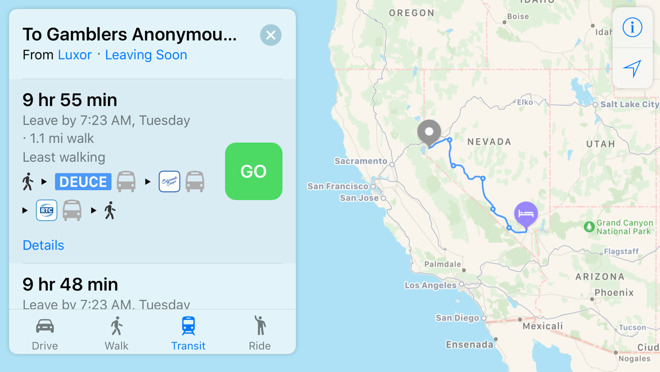
Apple Maps can also provide directions for Silverado Mainline buses, which travel between each of the cities, such as Reno to Las Vegas.
Apple Maps gained a Transit tab in iOS 9. The feature lags several years behind Google Maps, but Apple's public transportation support is exhaustive, mapping all station entrances and listing departure times.
At launch, the feature was limited to Baltimore, Berlin, Boston, Chicago, London, Los Angeles, Mexico City, New York, Philadelphia, San Francisco, Sydney, Toronto, and over 300 cities in China. Since then, Apple has been working to expand support for public transportation to other cities around the world.
Newer additions include Atlanta, Calgary, Columbus, Dallas, Denver, Detroit, Honolulu, Houston, Kansas City, Madrid, Manchester, Melbourne, Miami, Minneapolis–Saint Paul, Montréal, New Orleans, Paris, Portland, Pittsburgh, Prague, Rio de Janeiro, Sacramento, Salt Lake City, San Antonio, San Diego, Seattle, and Singapore.
For a complete list of cities with Apple Maps transit, visit the iOS Feature Availability page on Apple's website.
Source: macrumors










