 NEWS
NEWS
New iPhone 8 Glimpse Combines Leaked Parts to Show Off What Device Might Look Like at Launch
 06/27/2017
 3209
3209
Leaker Benjamin Geskin has posted a few new images and a video of what Apple's upcoming iPhone 8 might look like once it's in the hands of users later this year. Using a leaked dummy model, screen protector, and a printed picture of an iOS wallpaper, Geskin has put together the gist of what current rumors have suggested the iPhone 8 will look like once it's announced in the fall.
Geskin's images depict an iPhone 8 dummy model as we've seen previously, with a suggested 5.8-inch display area, minimal bezels, front-facing camera and sensor dip, but with an all-black frame instead of models that have previously depicted a rumored stainless steel frame. To give users a glimpse as to what the iPhone 8 display might look like when activated, Geskin then attached a picture of an iOS wallpaper to the dummy, and applied a screen protector on top.
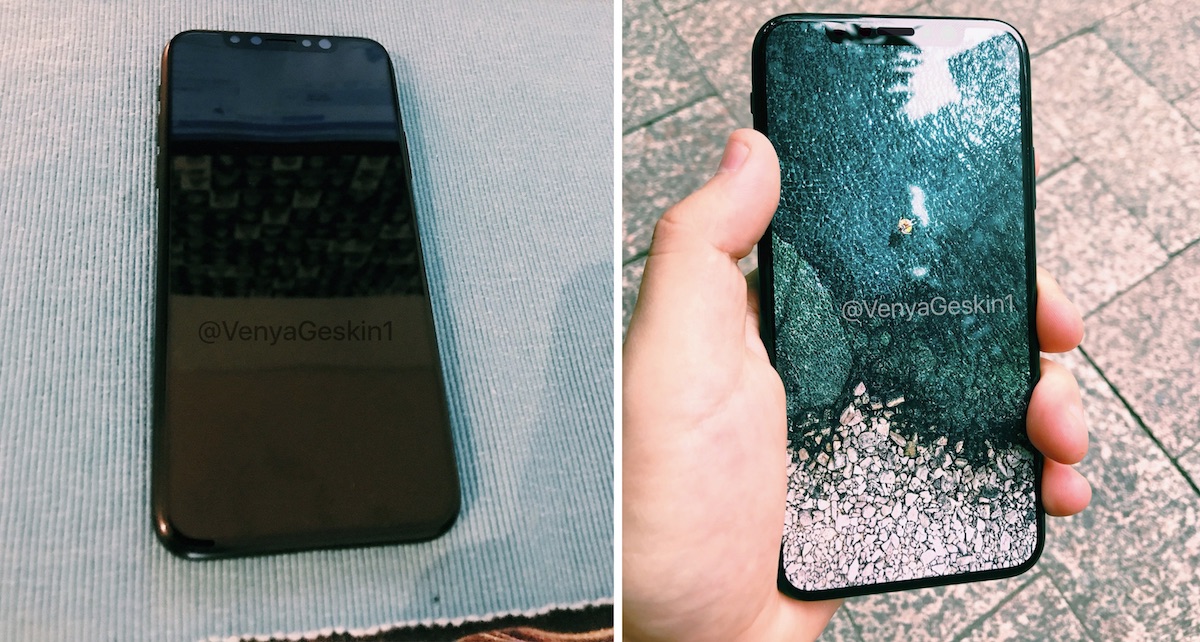
The wallpaper Geskin used is part of a beach themed collection of images that appeared within the iOS 10.3.3 beta only for the 12.9-inch iPad Pro, but they have since appeared on the 10.5-inch iPad Pro and new 12.9-inch iPad Pro running iOS 10.3.2.
The iPhone 8 is predicted to to be the first major iPhone redesign since the iPhone 6 in 2014, with additional features such as wireless charging and improved waterproofing to further bolster the smartphone's position as a premium device. Alongside the iPhone 8 will be the "iPhone 7s" and "iPhone 7s Plus," which are expected to keep the current iPhone 7 design while offering the usual iterative spec bumps like improved battery life and snappier performance.
Source: macrumors










