 NEWS
NEWS
Unicode 10.0 Arrives With 56 New Emoji Characters for iOS Integration
 06/21/2017
 5132
5132
The Unicode Consortium on Tuesday released version 10.0 of the Unicode Standard, offering a preview of new text characters and emoji that will likely arrive on Apple platforms like iOS later this year.
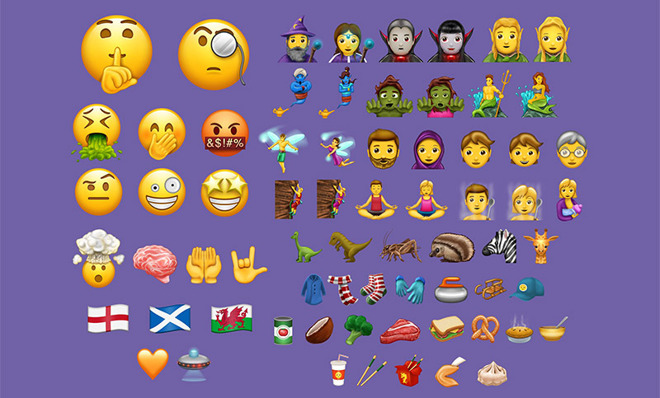
According to an announcement posted to the Unicode Blog, version 10.0 marks the first release in which both the core specification and data files are being made available simultaneously.
The latest Unicode iteration introduces 8,518 characters for a total of 136,690 characters. Four new scripts are also included in the release, bringing the total up to 139 scripts. Of note, the script additions support lesser used languages and specific written requirements like Masaram Gondi, Syriac letters, a set of 285 Hentaigana characters and more.
For iPhone users, the biggest additions for any Unicode launch are emoji characters. Version 10.0 introduces a slate of 56 new emoji including the Bitcoin symbol, a sampling of smiley faces, two dinosaurs, fantasy characters like mages and merpersons, flags, animals, bugs, foods and more.
As outlined by Emojipedia, Emoji 5.0 contains 56 code points that can be modified to create a total of 239 unique emoji.
A member of the Unicode Consortium, Apple is traditionally one of the first consumer manufacturers to implement newly released emoji in its various platforms. Integration normally starts with iOS and trickles down to macOS, though recent releases have seen the company implement Unicode sequences congruently.
Most recently, Apple in December added about 72 new emoji issued with the Unicode 9.9 standard. That particular release also incorporated redrawn and redesigned assets. iOS 10.3.1 Bugs May Be Used for Mach_Portal Users
Source: appleinsider










