
NEWS

Apple Music Now Has a $99/Year Subscription Option

06/20/2017

2848

Up to this point, the standard subscription options for Apple Music have been similar to the majority of competitors.


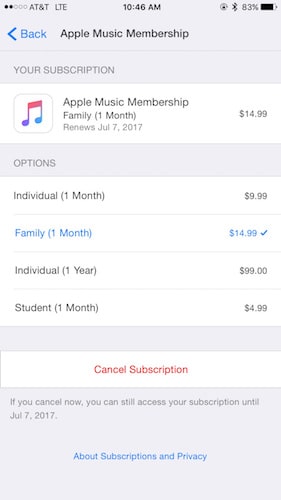
A student-focused subscription cost that brings the price down, the standard $9.99 per month option, and, finally, the $14.99 per month for a family plan. And now Apple has decided to add another option: A one-stop purchase price for $99, which covers the full year of a subscription cost. If you opt for the yearly subscription you’ll be saving $20 versus the standard monthly fee.

Apple Music Now Has a $99/Year Subscription Option


TechCrunch points out that the new option isn’t readily available, and Apple doesn’t seem to be promoting it out to the world just yet. It’s there, just buried. Also, interestingly enough, you can’t find the option if you aren’t an Apple Music subscriber. So if you want to sign up for the yearly option, you’ll need to sign up for one of the other already available options first, and then go through some extra steps:


“First, you need to open the App Store app and scroll to the very bottom of the Featured tab. Then tap on your Apple ID, enter your password and tap on “View Apple ID.” Finally, tap on the Subscriptions button and you can access your Apple Music membership settings. Here’s what it looks like (prices may vary depending on your country).”


Source: iphonehacks



Windows
Mac OS
iOS
Linux
3uTools
Win 64-bit For this device
V9.0 2025-11-11
Download
Win 32-bit For this device
V9.0 2025-11-11
Download
3uTools
Intel Chip How to Identify Chip Type
V9.0 2025-12-02
Download
Apple Silicon
V9.0 2025-12-02
Download
How to Identify Chip Type
1.  Click the Apple icon in the top-left corner of the screen and select About This Mac.
2.  Check the Processor or Chip field to determine if it is "Intel" or "Apple".
Please use the 3uTools PC client to install the iOS client:
1、 Install either the Windows or Mac version of 3uTools on your computer
2、 Open the PC client and connect your device to the computer via USB cable
3、 After the connection is successful, wait for the computer to automatically install the mobile app for the device, or locate “Install Mobile App” on the computer and manually click to install.
3uTools
deb file
V3.01 2025-11-20
Download
rpm file
V3.01 2025-11-20
Download
Windows
Windows
iOS
iOS
Android
Android
TV
TV
3uAirPlayer
Win 64-bit For this device
V6.0.2 2025-11-19
Download
Win 32-bit For this device
V6.0.2 2025-11-19
Download
iOS Device Mirroring (No App Required)
1、 Install 3uAirPlayer on the Windows PC
2、 Open Control Center and select Screen Mirroring
3、 From the list, choose your PC to start mirroring
4、 Or connect your iOS device to the PC via USB to begin mirroring
Scan to get "3uAirPlayer" App
3uAirPlayer TV V1.0.18
2025-11-28
TV System Requirements: Android 7.0 or later
Download the TV installation package, copy it to a USB drive, insert it into your TV or set-top box, then select the file from the home screen to install.




