
NEWS

Apple Branded Sneakers From Early 90s to Auction Off for Over $15,000

06/08/2017

2649

On June 11, a pair of official Apple-branded sneakers from the early 1990s will be sold at auction, with a starting bid of $15,000.
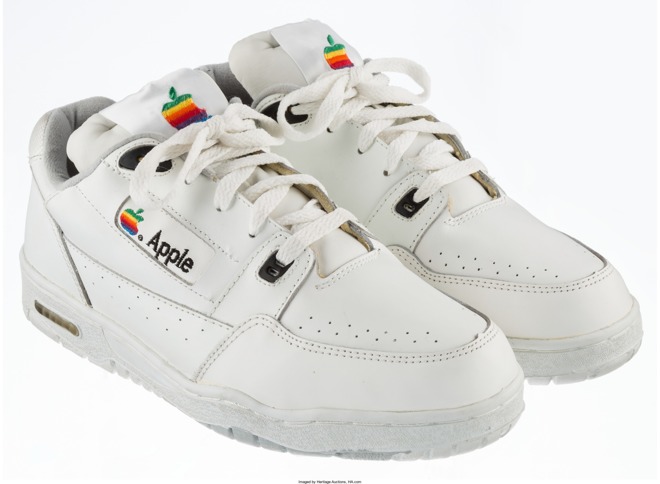

Apple Branded Sneakers From Early 90s to Auction Off for Over $15,000


The size 9 1/2 shoes have the rainbow version of Apple's logo stitched into the tongue and the side, and were made only for the company's own staff, according to seller Heritage Auctions. Although bidding will begin at $15,000, Heritage is estimating the value of the lot at $30,000 or more.


Proxy bidding will open before the auction, and end 10 minutes prior, at 10:50 a.m. Central time (11:50 a.m. Eastern). Notably Heritage is imposing a "buyer's premium" on successful bids, starting at 25 percent for the first $250,000.


Through partnerships, Apple offered a range of branded clothing and other non-electronic accessories for fans during the '80s and '90s. These included shirts, caps, bags, umbrellas, and even a sailboard. 


The company has since scaled back dramatically, mostly limiting accessories to things like cables, cases, and headphones. One exception is "Designed by Apple in California," a coffee table book with 450 photos of Macs, iPhones, iPods, and other products. It comes in two sizes, priced at $199 and $299, respectively.


Source: appleinsider

Windows
Mac OS
iOS
Linux
3uTools
Win 64-bit For this device
V9.0 2025-11-11
Download
Win 32-bit For this device
V9.0 2025-11-11
Download
3uTools
Intel Chip How to Identify Chip Type
V9.0 2025-12-02
Download
Apple Chip
V9.0 2025-12-02
Download
How to Identify Chip Type
1.  Click the Apple icon in the top-left corner of the screen and select About This Mac.
2.  Check the Processor or Chip field to determine if it is "Intel" or "Apple".
Please use the 3uTools PC client to install the iOS client:
1、 Install either the Windows or Mac version of 3uTools on your computer
2、 Open the PC client and connect your device to the computer via USB cable
3、 After the connection is successful, wait for the computer to automatically install the mobile app for the device, or locate “Install Mobile App” on the computer and manually click to install.
3uTools
deb file
V3.01 2025-11-20
Download
rpm file
V3.01 2025-11-20
Download
Windows
Windows
iOS
iOS
Android
Android
TV
TV
3uAirPlayer
Win 64-bit For this device
V6.0.2 2025-11-19
Download
Win 32-bit For this device
V6.0.2 2025-11-19
Download
iOS Device Mirroring (No App Required)
1、 Install 3uAirPlayer on the Windows PC
2、 Open Control Center and select Screen Mirroring
3、 From the list, choose your PC to start mirroring
4、 Or connect your iOS device to the PC via USB to begin mirroring
Scan to get "3uAirPlayer" App
3uAirPlayer TV V1.0.18
2025-11-28
TV System Requirements: Android 7.0 or later
Download the TV installation package, copy it to a USB drive, insert it into your TV or set-top box, then select the file from the home screen to install.




