
NEWS

Meet the Completely Redesigned App Store For the iPhone

06/06/2017

3268

As expected, today’s WWDC 2017 keynote was absolutely loaded with announcements, from watchOS 4 to macOS High Sierra to a range of new Macs and MacBooks as well as iOS 11, but it’s not over yet. In the back half of the event on Monday, Apple announced a complete redesign for the App Store.


Unsurprisingly, the new App Store features many of the same design principals as the big Apple Music revamp from last year. When you open the redesigned App Store, you’ll be presented with a “Today” tab, which features colorful, screen-filling cards that you can scroll through to see what’s new.
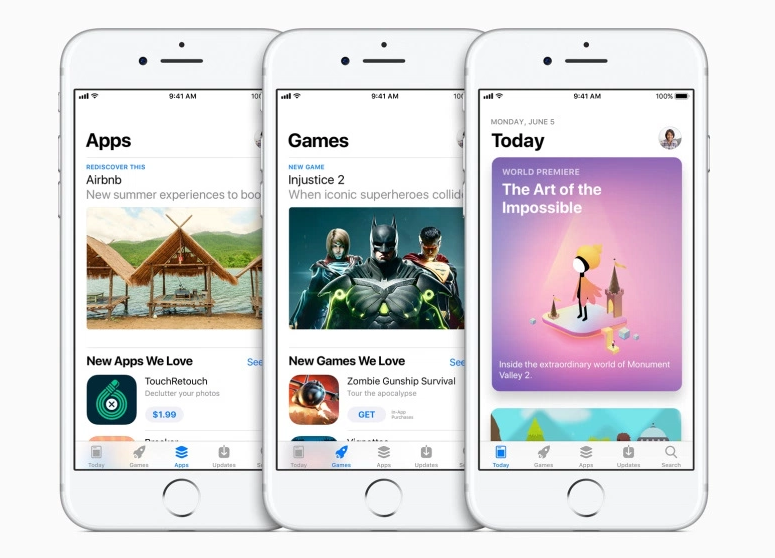

Meet the Completely Redesigned App Store For the iPhone


At the bottom of the App Store, you’ll find five tabs: Today, Games, Apps, Updates and Search. So in iOS 11, games have their own tab, separate from the rest of the apps and easily accessible from anywhere in the App Store. Although the tabs are similar to the categories currently on the App Store, they have been given an attractive facelift with larger images, more detailed descriptions and video streams of gameplay that start automatically on the page as the user scrolls down.


Functionally, the App Store will be basically the same, but navigation is going to be majorly improved, if the stage demo was anything to go by. The App Store hasn’t received a major redesign since it launched, so this is a big step for Apple. It should also make developers happier by finally splitting up Games and Apps. Now that new weather app won’t have to fight for real estate with Pokemon Go.


Source: bgr

Windows
Mac OS
iOS
Linux
3uTools
Win 64-bit For this device
V9.0 2025-11-11
Download
Win 32-bit For this device
V9.0 2025-11-11
Download
3uTools
Intel Chip How to Identify Chip Type
V9.0 2025-12-02
Download
Apple Chip
V9.0 2025-12-02
Download
How to Identify Chip Type
1.  Click the Apple icon in the top-left corner of the screen and select About This Mac.
2.  Check the Processor or Chip field to determine if it is "Intel" or "Apple".
Please use the 3uTools PC client to install the iOS client:
1、 Install either the Windows or Mac version of 3uTools on your computer
2、 Open the PC client and connect your device to the computer via USB cable
3、 After the connection is successful, wait for the computer to automatically install the mobile app for the device, or locate “Install Mobile App” on the computer and manually click to install.
3uTools
deb file
V3.01 2025-11-20
Download
rpm file
V3.01 2025-11-20
Download
Windows
Windows
iOS
iOS
Android
Android
TV
TV
3uAirPlayer
Win 64-bit For this device
V6.0.2 2025-11-19
Download
Win 32-bit For this device
V6.0.2 2025-11-19
Download
iOS Device Mirroring (No App Required)
1、 Install 3uAirPlayer on the Windows PC
2、 Open Control Center and select Screen Mirroring
3、 From the list, choose your PC to start mirroring
4、 Or connect your iOS device to the PC via USB to begin mirroring
Scan to get "3uAirPlayer" App
3uAirPlayer TV V1.0.18
2025-11-28
TV System Requirements: Android 7.0 or later
Download the TV installation package, copy it to a USB drive, insert it into your TV or set-top box, then select the file from the home screen to install.




