 NEWS
NEWS
Happy 25th Birthday to Apple Newton
 05/31/2017
 3751
3751
Exactly 25 years ago, on May 29, 1992, Apple CEO John Sculley went on stage during the CES show in Chicago and launched a tablet.
If that sentence sounds all wrong, that's because a lot has changed in the quarter decade since. If you even remember Sculley as Apple CEO, you're probably thinking of the man who pushed Steve Jobs out of the company. And in the nineties, no one had tablets. And isn't CES typically held in Las Vegas?
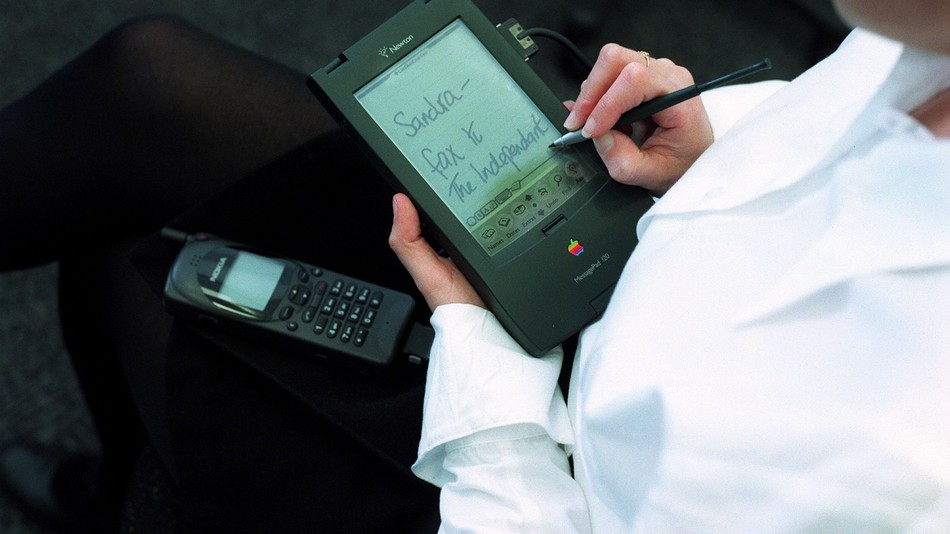
To that we say: Yes, yes and yes. The tablet Sculley presented that year was the Newton, a device that had some potential, but essentially came out a decade and a half too early.
The Newton proved to be a flop, but its impact was huge. The product marked the beginning of a dark era for Apple, one in which the company nearly went bankrupt. Without those struggles, there's a good chance Steve Jobs doesn't return to Apple in 1997. With no Jobs back at Apple, who knows what happens to products like the iPod or iPhone.
And, for you history buffs out there, back in early nineties, there were two CES shows each year, a summer one in Chicago, and a winter one in Vegas.
But the Newton, in all its varieties (Apple released 7 models over a span of six years), was also an enormous pain to use. The data transfer was slow. The stylus-powered screen was atrocious—just look at Apple's own promotional video below and imagine doing any sort of work on that.
Surprisingly, it was quite innovative in many ways. It had infrared networking, meaning you could beam emails and messages from it wirelessly. It had handwriting recognition. It theoretically learned from you and got better the more you used it. It came with a nifty set of productivity apps, including pretty advanced note-taking and contact apps.
Using a Newton today would be a painful experience, but it's far from impossible. If you're interested in a trip down memory lane, you can still purchase a working Newton on eBay, with prices ranging from ten bucks to $1,500 for rare and limited edition units. Just don't expect it to replace your iPad in daily usage.
Source: mashable










