 NEWS
NEWS
Number of Siri-style AI Assistants Will Overtake Humans by 2021
 05/19/2017
 4081
4081
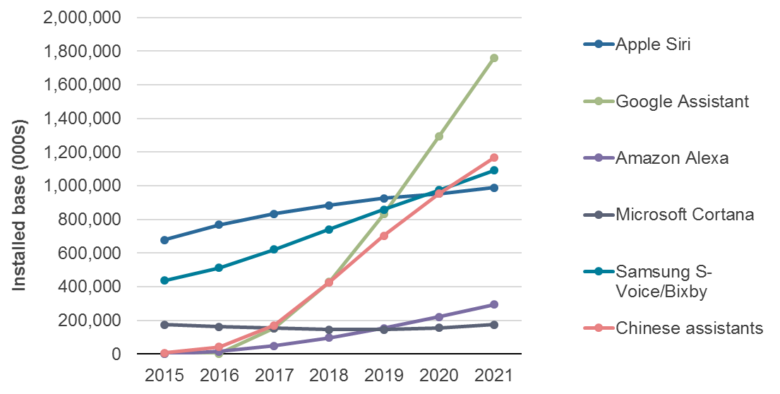
The number of AI assistants by 2021 will outnumber the current world population, according to market research group Ovum’s new Digital Assistant and Voice AI–Capable Device Forecast.
The report highlights the growing popularity of Siri-style smart assistants, and also offers some intriguing predictions as to which AI assistants will become big, and which will be also-rans.
As can be seen from the chart at the top of this story, Google Assistant — which was yesterday announced as being on its way to iOS — is predicted as occupying 23.3 percent market share in 2021. After this, Samsung’s slightly flawed Bixby is set to occupy second place with 14.5 percent, Apple’s Siri with 13.1 percent, Amazon’s Alexa with 3.9 percent, and Microsoft’s Cortana with 2.3 percent.
While right now the majority of devices used to access smart assistants are smartphones and tablets, Ovum thinks that this will gradually shift as wearable devices, TV set-top boxes, smart home speakers, and more continue their rise. By 2021. the market research firm suggests AI assistants will be found on 1.63 billion devices.
They also note the importance of expanding overseas:
“The most important challenge for vendors will be to deploy and maintain their digital assistants globally. At the end of 2016, over 95% of the installed base for Amazon’s Alexa and Google Assistant was in North America, compared to 24% for Apple’s Siri. By 2021, 47.6% of voice AI–capable devices in use will be in Asia & Oceania. With an active installed base close to 1.2 billion devices in 2021, digital assistants of Chinese origin are set to be as powerful as Apple’s Siri or Samsung’s Bixby. They already accounted for close to 43 million devices in 2016, led by companies such as Baidu and iFlytek.”
It’s definitely interesting stuff, and something Apple is trying its hardest to keep up with. Although Apple was the first mainstream tech company to introduce a smart AI voice assistant with the iPhone 4s in 2011, in the years since then it has fallen behind a lot of its rivals.
More recently, it has made a concerted effort to catch up again — with decisions like switching to using deep learning tech in 2014, making Siri a key part of the Apple TV interface with the fourth-generation model, and bringing Siri to Mac with the latest macOS. At this year’s WWDC, Apple is widely predicted to be introducing a standalone Siri speaker that could serve as a rival to Amazon’s Echo product line.
Source: cult of mac










