NEWS

Singapore's First Apple Store Opens May 27

05/17/2017

3648

Singapore's First Apple Store Opens May 27


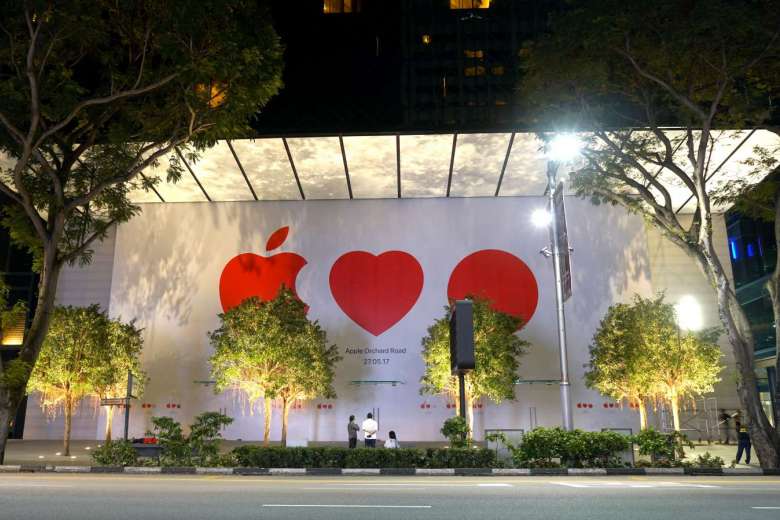
Apple's first retail store in both Singapore and Southeast Asia will open Saturday, May 27 at 10:00 a.m. local time, according to an official opening date recently added to the white facade covering the long-awaited Orchard Road location. 


As noted by The Straits Times, workers were seen adding the opening date on the white facade that covers the front of the store at the Knightsbridge shopping complex close to midnight on Tuesday night local time. 

Earlier this month, Apple began removing construction barriers around the store, revealing a large mural and 12 smaller pieces of artwork that showcase the 
Apple logo, a heart, and a little red dot, referencing Apple's love for Singapore. "Little red dot" is a widely known nickname for Singapore, home to over 5 million people. 

Apple's plans to open its first retail store in Singapore were 
revealed by gym chain Pure Fitness, which closed in December 2015 to make space for the Apple Store in its exact location. Apple confirmed the store and began hiring retail employees in November 2015, and construction has been underway over the past year. 

The store will open daily from 10 a.m. to 10 p.m. local time. The location will likely feature Apple's next-generation retail design. 


Source: macrumors


Windows
Mac OS
iOS
Linux
3uTools
Win 64-bit For this device
V9.0 2025-11-11
Download
Win 32-bit For this device
V9.0 2025-11-11
Download
3uTools
Intel Chip How to Identify Chip Type
V9.0 2025-12-02
Download
Apple Silicon
V9.0 2025-12-02
Download
How to Identify Chip Type
1.  Click the Apple icon in the top-left corner of the screen and select About This Mac.
2.  Check the Processor or Chip field to determine if it is "Intel" or "Apple".
Please use the 3uTools PC client to install the iOS client:
1、 Install either the Windows or Mac version of 3uTools on your computer
2、 Open the PC client and connect your device to the computer via USB cable
3、 After the connection is successful, wait for the computer to automatically install the mobile app for the device, or locate “Install Mobile App” on the computer and manually click to install.
3uTools
deb file
V3.01 2025-11-20
Download
rpm file
V3.01 2025-11-20
Download
Windows
Windows
iOS
iOS
Android
Android
TV
TV
3uAirPlayer
Win 64-bit For this device
V6.0.2 2025-11-19
Download
Win 32-bit For this device
V6.0.2 2025-11-19
Download
iOS Device Mirroring (No App Required)
1、 Install 3uAirPlayer on the Windows PC
2、 Open Control Center and select Screen Mirroring
3、 From the list, choose your PC to start mirroring
4、 Or connect your iOS device to the PC via USB to begin mirroring
Scan to get "3uAirPlayer" App
3uAirPlayer TV V1.0.18
2025-11-28
TV System Requirements: Android 7.0 or later
Download the TV installation package, copy it to a USB drive, insert it into your TV or set-top box, then select the file from the home screen to install.