
NEWS

iOS 11 & MacOS 10.13 Will Feature A New Automator App

05/04/2017

3768

Back in March, it was reported that Apple has acquired Workflow, a powerful automation app for the iPad and iPhone. At the time, the only thing that can be said about the subject matter is the fact that the application is quite intuitive on how it uses iOS accessibility features. Now, rumor has it that the same team who worked on the said app will be involved in the development of a new Automator app for iOS 11 and macOS 10.13.


The leak also claims that the new Automator app will be based on the same Workflow app for iOS. Also, it will feature advanced Siri support as well as deeper OS and iCloud integration.
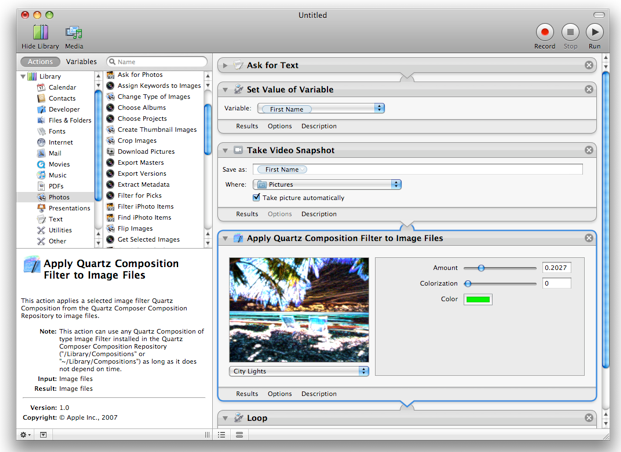

iOS 11 & MacOS 10.13 Will Feature A New Automator App


Unfortunately, the leaker did not present any proof to substantiate the claims. So, readers are urged to take this one with a grain of salt. Nevertheless, for some hardcore Mac users, this bit of news is quite important. This just means that the Automator app still lives on. Especially now that the guru of macOS automation has left the company a few months back.


For those who are unaware, Sal Saghoian, Apple’s main guy for the Automator app, has left the company back in November last year. While surely a loss for the company, it seems like Apple is still serious about automation on macOS.


Source: mobipicker

Windows
Mac OS
iOS
Linux
3uTools
Win 64-bit For this device
V9.0 2025-11-11
Download
Win 32-bit For this device
V9.0 2025-11-11
Download
3uTools
Intel Chip How to Identify Chip Type
V9.0 2025-12-02
Download
Apple Silicon
V9.0 2025-12-02
Download
How to Identify Chip Type
1.  Click the Apple icon in the top-left corner of the screen and select About This Mac.
2.  Check the Processor or Chip field to determine if it is "Intel" or "Apple".
Please use the 3uTools PC client to install the iOS client:
1、 Install either the Windows or Mac version of 3uTools on your computer
2、 Open the PC client and connect your device to the computer via USB cable
3、 After the connection is successful, wait for the computer to automatically install the mobile app for the device, or locate “Install Mobile App” on the computer and manually click to install.
3uTools
deb file
V3.01 2025-11-20
Download
rpm file
V3.01 2025-11-20
Download
Windows
Windows
iOS
iOS
Android
Android
TV
TV
3uAirPlayer
Win 64-bit For this device
V6.0.2 2025-11-19
Download
Win 32-bit For this device
V6.0.2 2025-11-19
Download
iOS Device Mirroring (No App Required)
1、 Install 3uAirPlayer on the Windows PC
2、 Open Control Center and select Screen Mirroring
3、 From the list, choose your PC to start mirroring
4、 Or connect your iOS device to the PC via USB to begin mirroring
Scan to get "3uAirPlayer" App
3uAirPlayer TV V1.0.18
2025-11-28
TV System Requirements: Android 7.0 or later
Download the TV installation package, copy it to a USB drive, insert it into your TV or set-top box, then select the file from the home screen to install.




