
NEWS

Apple's Next iPhone Could Trigger A Massive Upgrade Wave

05/03/2017

3375

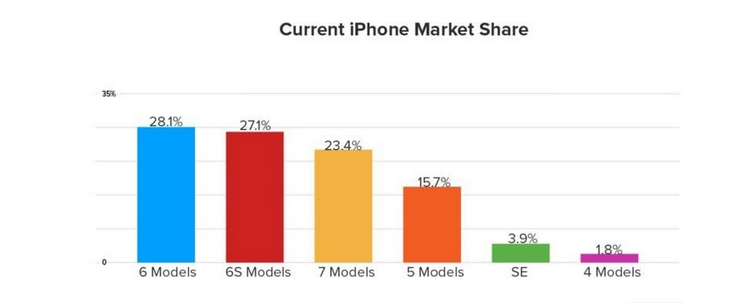
According to data released by analytics firm Localytics, Apple's next iPhone could benefit from a massive upgrade wave as owners of the hugely popular iPhone 6 begin looking for a new handset.


The data shows that 28 percent of iPhone users are running the iPhone 6, and come September, these devices will begin hitting the three-year-old mark, with another 15.7 percent running the iPhone 5 and iPhone 5s models.

Apple's Next iPhone Could Trigger A Massive Upgrade Wave


When people upgrade is variable -- it's a fuzzy line that spans 18 months to three years (not accounting for breakages and such) -- but factoring into the equation the fact that the iPhone 6 was a big hit for Apple (and a release that itself triggered a huge upgrade wave for the company), the numbers are looking good for Apple.


Now, whether these owners of older devices will unlimber their wallets and purses and actually spend the money on new hardware remains to be seen. Apple's past experience suggests that the limiting factor might not be demand but whether Apple can keep up with that demand.


Source: zdnet

Windows
Mac OS
iOS
Linux
3uTools
Win 64-bit For this device
V9.0 2025-11-11
Download
Win 32-bit For this device
V9.0 2025-11-11
Download
3uTools
Intel Chip How to Identify Chip Type
V9.0 2025-12-02
Download
Apple Silicon
V9.0 2025-12-02
Download
How to Identify Chip Type
1.  Click the Apple icon in the top-left corner of the screen and select About This Mac.
2.  Check the Processor or Chip field to determine if it is "Intel" or "Apple".
Please use the 3uTools PC client to install the iOS client:
1、 Install either the Windows or Mac version of 3uTools on your computer
2、 Open the PC client and connect your device to the computer via USB cable
3、 After the connection is successful, wait for the computer to automatically install the mobile app for the device, or locate “Install Mobile App” on the computer and manually click to install.
3uTools
deb file
V3.01 2025-11-20
Download
rpm file
V3.01 2025-11-20
Download
Windows
Windows
iOS
iOS
Android
Android
TV
TV
3uAirPlayer
Win 64-bit For this device
V6.0.2 2025-11-19
Download
Win 32-bit For this device
V6.0.2 2025-11-19
Download
iOS Device Mirroring (No App Required)
1、 Install 3uAirPlayer on the Windows PC
2、 Open Control Center and select Screen Mirroring
3、 From the list, choose your PC to start mirroring
4、 Or connect your iOS device to the PC via USB to begin mirroring
Scan to get "3uAirPlayer" App
3uAirPlayer TV V1.0.18
2025-11-28
TV System Requirements: Android 7.0 or later
Download the TV installation package, copy it to a USB drive, insert it into your TV or set-top box, then select the file from the home screen to install.




