
NEWS

Apple Patent Reveals Unusual Designs For iPhone-laptop Hybrid

03/24/2017

2661

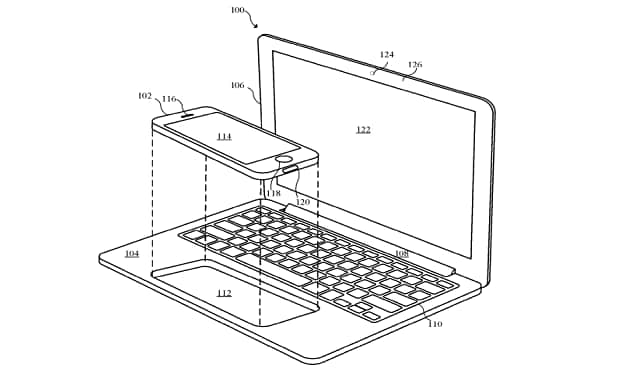
An Apple patent has revealed designs for a new gadget that could instantaneously turn an iPhone into a MacBook hybrid.


The technology giant filed the patent last year for an electronic accessory device that can be used to extend the functionality of a smartphone to a laptop-style terminal.


“It is anticipated that the accessory device is not a stand-alone computing device but only acts in concert with a host device,” the patent, which has just been published, says.

Apple Patent Reveals Unusual Designs For iPhone-laptop Hybrid


“The host device can be a portable computing device, such as  a smart phone, media player, tablet computer, or other portable computing device.”


iPhone would effectively become the ‘brains’ of the laptop which would run iOS over MacOS.


Another design showed an iPad which could slot into the space where the laptop’s screen would usually be.


Source: telegraph


Windows
Mac OS
iOS
Linux
3uTools
Win 64-bit For this device
V9.0 2025-11-11
Download
Win 32-bit For this device
V9.0 2025-11-11
Download
3uTools
Intel Chip How to Identify Chip Type
V9.0 2025-12-02
Download
Apple Silicon
V9.0 2025-12-02
Download
How to Identify Chip Type
1.  Click the Apple icon in the top-left corner of the screen and select About This Mac.
2.  Check the Processor or Chip field to determine if it is "Intel" or "Apple".
Please use the 3uTools PC client to install the iOS client:
1、 Install either the Windows or Mac version of 3uTools on your computer
2、 Open the PC client and connect your device to the computer via USB cable
3、 After the connection is successful, wait for the computer to automatically install the mobile app for the device, or locate “Install Mobile App” on the computer and manually click to install.
3uTools
deb file
V3.01 2025-11-20
Download
rpm file
V3.01 2025-11-20
Download
Windows
Windows
iOS
iOS
Android
Android
TV
TV
3uAirPlayer
Win 64-bit For this device
V6.0.2 2025-11-19
Download
Win 32-bit For this device
V6.0.2 2025-11-19
Download
iOS Device Mirroring (No App Required)
1、 Install 3uAirPlayer on the Windows PC
2、 Open Control Center and select Screen Mirroring
3、 From the list, choose your PC to start mirroring
4、 Or connect your iOS device to the PC via USB to begin mirroring
Scan to get "3uAirPlayer" App
3uAirPlayer TV V1.0.18
2025-11-28
TV System Requirements: Android 7.0 or later
Download the TV installation package, copy it to a USB drive, insert it into your TV or set-top box, then select the file from the home screen to install.




