NEWS

Google Launches Uptime Collaborative YouTube Viewing App Exclusively for iOS

03/14/2017

2901

Google Launches Uptime Collaborative YouTube Viewing App Exclusively for iOS


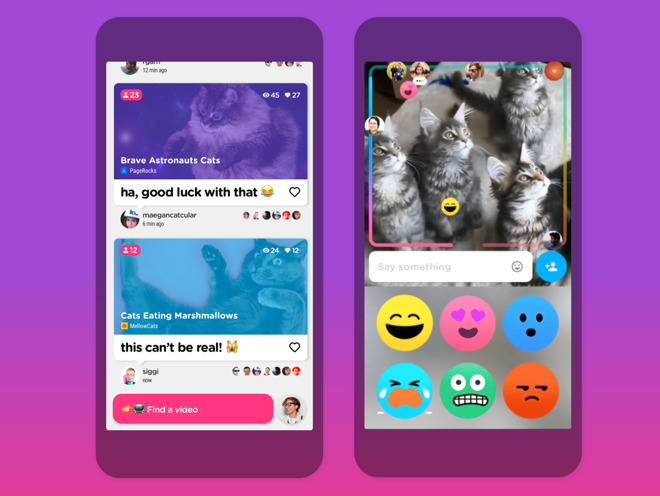
Users of the app will see other viewers icons progressing along the video's progress bar. Users can follow other Uptime users to see what they're watching, and share clips from the service from within the app.

The app also features live commentary by people watching the video, as well as the ability to like videos, and get daily video recommendations from friends and people you follow.

At present, the app is iOS-only, with no sign of an Android app.

The app itself is currently available on the iOS App Store, 
and is free, but requires an invite to use. According to TNW, code "PIZZA" can be used to garner an invitation for the service.

The Uptime app came out of Google's incubator program, first launched formally in 2004.

"We encourage our employees, in addition to their regular projects, to spend 20% of their time working on what they think will most benefit Google," Google founders Larry Page and Sergey Brin wrote in 2004, launching the program. "This empowers them to be more creative and innovative. Many of our significant advances have happened in this manner."

The 20% rule turned into the Area 120 incubation program, which is now helmed by long-time Google executives Don Harrison and Bradley Horowitz. Other 20% projects in the past have included Gmail, and Google News.


Source: appleinsider

Windows
Mac OS
iOS
Linux
3uTools
Win 64-bit For this device
V9.0 2025-11-11
Download
Win 32-bit For this device
V9.0 2025-11-11
Download
3uTools
Intel Chip How to Identify Chip Type
V9.0 2025-12-02
Download
Apple Silicon
V9.0 2025-12-02
Download
How to Identify Chip Type
1.  Click the Apple icon in the top-left corner of the screen and select About This Mac.
2.  Check the Processor or Chip field to determine if it is "Intel" or "Apple".
Please use the 3uTools PC client to install the iOS client:
1、 Install either the Windows or Mac version of 3uTools on your computer
2、 Open the PC client and connect your device to the computer via USB cable
3、 After the connection is successful, wait for the computer to automatically install the mobile app for the device, or locate “Install Mobile App” on the computer and manually click to install.
3uTools
deb file
V3.01 2025-11-20
Download
rpm file
V3.01 2025-11-20
Download
Windows
Windows
iOS
iOS
Android
Android
TV
TV
3uAirPlayer
Win 64-bit For this device
V6.0.2 2025-11-19
Download
Win 32-bit For this device
V6.0.2 2025-11-19
Download
iOS Device Mirroring (No App Required)
1、 Install 3uAirPlayer on the Windows PC
2、 Open Control Center and select Screen Mirroring
3、 From the list, choose your PC to start mirroring
4、 Or connect your iOS device to the PC via USB to begin mirroring
Scan to get "3uAirPlayer" App
3uAirPlayer TV V1.0.18
2025-11-28
TV System Requirements: Android 7.0 or later
Download the TV installation package, copy it to a USB drive, insert it into your TV or set-top box, then select the file from the home screen to install.