NEWS
iOS 27.3 Adds Selfie Sing to Apple Music: Record Karaoke Videos
 11/04/2026
 36
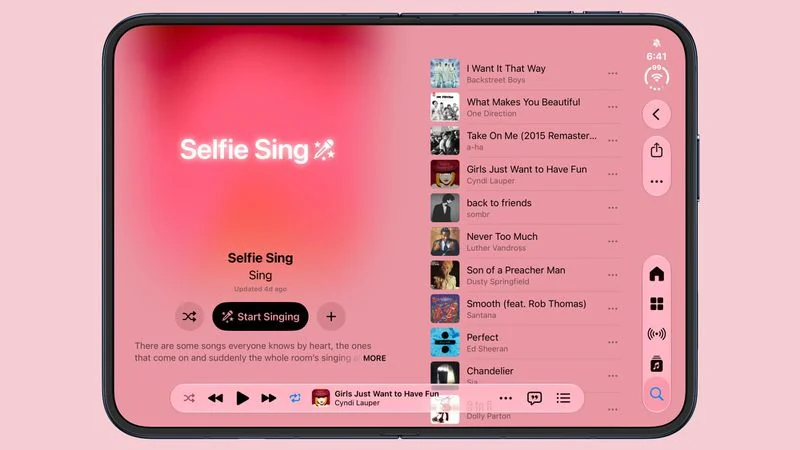
Apple is introducing a new Selfie Sing feature in Apple Music with iOS 27.3, allowing users to record themselves singing along to their favorite songs and share the videos with friends.
The feature combines Apple's existing Apple Music Sing karaoke experience with the iPhone's front-facing camera. Users can follow on-screen lyrics, record their performances, adjust vocal effects, and save or share their videos.
How Selfie Sing Works in Apple Music
Selfie Sing comes with a dedicated playlist featuring popular songs that users can sing along to. After selecting a supported track, users can tap the camera icon to activate the feature.
The iPhone switches to a selfie camera view, displaying the song's lyrics on the screen. Tapping the red record button starts capturing the video while the lyrics scroll in time with the music.
Once the song finishes, users can customize their recordings before sharing them.
Four Vocal Effects Available
Selfie Sing includes several audio effects that let users adjust how their voices sound in the final video.
The available options include:
●Megaphone: Gives vocals a megaphone-like sound.
●Echo: Adds an echo effect to the voice.
●Concert Hall: Creates a spacious, concert-style sound.
●Studio: Applies a studio-inspired vocal effect.
Users can also adjust the volume of their vocals, save the finished video to the Photos library, or share it with others.
Selfie Sing Playlist Features Popular Songs
Apple has created a dedicated Selfie Sing playlist featuring well-known tracks that are easy to sing along to.
Some of the songs currently included are:
●"Respect" – Aretha Franklin
●"Girls Just Want to Have Fun" – Cyndi Lauper
●"Like a Virgin" – Madonna
●"Wonderwall" – Oasis
●"Hungry Like the Wolf" – Duran Duran
●"...Baby One More Time" – Britney Spears
However, Selfie Sing is not currently available for every song in the Apple Music catalog. For now, users can only record videos with supported tracks, although Apple could expand compatibility in future updates.
Selfie Sing Requires the iOS 27.3 Beta
Although the dedicated Selfie Sing playlist appears on iPhones running iOS 27.2, the actual selfie recording feature currently requires the iOS 27.3 beta.
Selfie Sing appears to build on Apple Music Sing, the karaoke feature Apple introduced with iOS 16.2. While Apple Music Sing lets users sing along with adjustable vocals and real-time lyrics, Selfie Sing adds video recording and sharing to the experience.
The new feature gives Apple Music users another way to enjoy their favorite songs, turning karaoke sessions into shareable video moments.
Source: Macrumors