 NEWS
NEWS
Apple Maps Adds Detailed 3D City Experience and F1 Features in Austin
 10/15/2026
 45
45
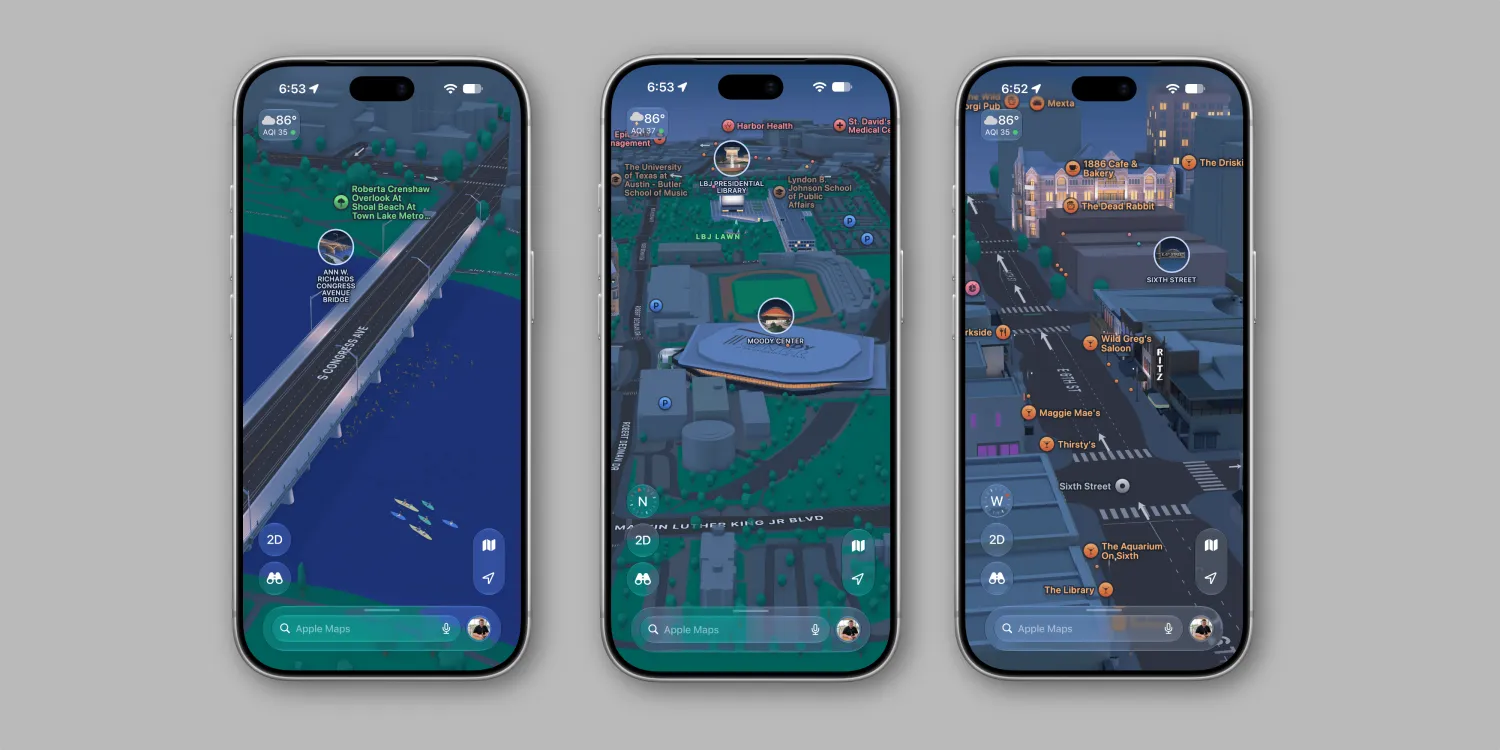
Apple is rolling out its Detailed City Experience in Apple Maps for Austin, Texas, bringing richer 3D visuals, more detailed landmarks, and improved navigation to the city. The update arrives ahead of the Formula 1 United States Grand Prix and introduces a dedicated mapping experience for the Circuit of the Americas.
Austin joins other cities, including San Francisco, Chicago, and London, that already support Apple's enhanced mapping experience.
Apple Maps Brings More Detailed 3D Views to Austin
The new Detailed City Experience adds more geographic and architectural detail to Apple Maps, making it easier for users to explore Austin and recognize important locations.
The update includes enhanced representations of elevation, buildings, trees, road features, and prominent landmarks. Notable locations featured in the Austin experience include:
●Texas Capitol — the seat of Texas state government.
●Q2 Stadium — a major sports and event venue.
●Blanton Museum of Art — a prominent art museum in Austin.
●Paramount Theatre — a historic entertainment venue.
●Congress Avenue Bridge — a well-known landmark spanning Lady Bird Lake.
These additions create a more immersive view of the city, helping users better understand their surroundings before arriving at a destination.
Improved Driving and Walking Navigation
The Detailed City Experience also enhances navigation in Austin, with more detailed road markings, improved guidance, and richer visual information.
Drivers can benefit from clearer road layouts and more realistic surroundings, while pedestrians can use the additional detail to navigate urban areas more confidently.
The improvements extend to Apple Maps in CarPlay, bringing the updated mapping experience to compatible in-car displays.
Apple Maps Adds a Dedicated F1 Experience for Circuit of the Americas
Ahead of the Formula 1 United States Grand Prix, Apple is also introducing a dedicated mapping experience for Circuit of the Americas (COTA) in Austin.
The F1 experience features detailed circuit maps and 3D representations of key locations throughout the venue. Similar features have been introduced for other Formula 1 races around the world this year.
For fans attending the Grand Prix in person, Apple Maps can also provide useful race-day information, including:
●Circuit maps and key venue locations
●Navigation to relevant destinations
●Walking directions around the venue
●Information about available race-day amenities
These features could make it easier for spectators to find their way around the circuit and plan their visit during the race weekend.
How to Access the New Apple Maps Features
The updated Apple Maps experience for Austin is rolling out now. Users can explore the new city details and F1 circuit features in the Maps app on iPhone, iPad, and Mac.
Apple is also expanding access to Formula 1 coverage. Starting this year, Apple TV subscribers can stream all F1 races at no additional charge, making the service another option for fans who want to follow the championship.
A More Immersive Apple Maps Experience
The Austin rollout demonstrates Apple's continued investment in detailed 3D mapping and location-based experiences. By combining improved city visuals, enhanced navigation, and event-specific information, Apple Maps is becoming more useful for both everyday travel and major sporting events.
With the United States Grand Prix approaching, the new Circuit of the Americas experience gives F1 fans another way to prepare for race day.
Source: 9to5mac










