
NEWS

iOS 27 Beta 5 Brings New Icons for Siri, Safari, Settings and More

08/11/2026

20

In the fifth beta of iOS 27, Apple is continuing to make design tweaks. There are updated Liquid Glass icons for Safari, the Siri app, Settings, Remote, App Store, and Preview.
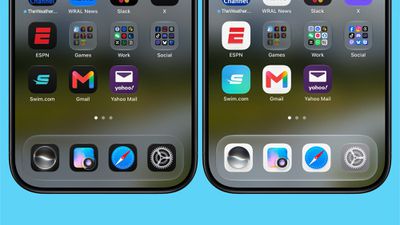
iOS 27 Beta 5 Brings New Icons for Siri, Safari, Settings and More
The Safari icon is a brighter blue with more detailed compass lines and arrows, while the ‌Siri‌ icon looks more like the actual ‌Siri‌ bubble that's displayed when ‌Siri‌ is activated. The ‌App Store‌ app icon is more translucent so you can better see each line making up the A, Settings uses more translucency, and Preview has an entirely different look with a loupe over a colorful background. The Remote icon also has more detail and it's been updated with a gray background instead of black.

Some app icons were updated with the initial ‌iOS 27‌ beta release, including Maps, Photos, and Weather, but others kept their iOS 26 look.

It's possible Apple will overhaul even more icons in upcoming betas, because the company said it was planning to give icons an updated layered look to better fit the Liquid Glass aesthetic.

‌iOS 27‌ will be released in just about a month.

Source: Macrumors

Windows
Mac OS
iOS
Linux
3uTools
Win 64-bit For this device
V9.07 2026-07-17
Download
Win 32-bit For this device
V9.07 2026-07-17
Download
3uTools
Intel Chip How to Identify Chip Type
V9.05 2026-07-25
Download
Apple Silicon
V9.05 2026-07-25
Download
How to Identify Chip Type
1.  Click the Apple icon in the top-left corner of the screen and select About This Mac.
2.  Check the Processor or Chip field to determine if it is "Intel" or "Apple".
Please use the 3uTools PC client to install the iOS client:
1、 Install either the Windows or Mac version of 3uTools on your computer
2、 Open the PC client and connect your device to the computer via USB cable
3、 After the connection is successful, wait for the computer to automatically install the mobile app for the device, or locate “Install Mobile App” on the computer and manually click to install.
3uTools
deb file
V9.01 2026-05-28
Download
rpm file
V9.01 2026-05-28
Download
Windows
Windows
iOS
iOS
Android
Android
TV
TV
3uAirPlayer
Win 64-bit For this device
V6.0.6 2026-06-26
Download
Win 32-bit For this device
V6.0.6 2026-06-26
Download
iOS Device Mirroring (No App Required)
1、 Install 3uAirPlayer on the Windows PC
2、 Open Control Center and select Screen Mirroring
3、 From the list, choose your PC to start mirroring
4、 Or connect your iOS device to the PC via USB to begin mirroring
Scan to get "3uAirPlayer" App
3uAirPlayerTV
 
TV System Requirements: Android 7.0 or later
Download the TV installation package, copy it to a USB drive, insert it into your TV or set-top box, then select the file from the home screen to install.




