 NEWS
NEWS
watchOS 27 Features Dynamic App Grid, New Gesture Control, and More
 06/09/2026
 880
880
Apple today unveiled watchOS 27, featuring a redesigned dynamic app grid, new gesture controls, and a raft of usability and battery improvements.
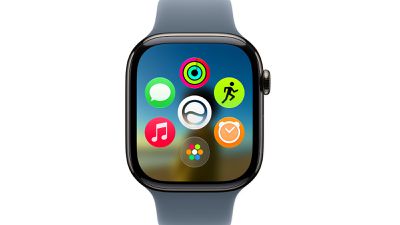
The new dynamic app grid surfaces and rearranges five apps based on context and usage. Users can simply tap the bottom center icon to go to the rest of their apps.
A new tap gesture lets users select a widget in the Smart Stack by tapping their index finger and thumb together once, allowing interaction even when the other hand is occupied. Apple is also expanding Smart Stack suggestions to surface more contextually relevant widgets, including birthday reminders for close contacts, a parked car location card, sleep alarm adjustments ahead of select holidays, and transit card balance checks.
Users can now create custom passes for any membership or card that uses a QR code or barcode, such as a library card, using their iPhone and access it directly from the Apple Watch's Wallet app or pin it to the Smart Stack. Transit cards and IDs will also appear in the Smart Stack.
Apple says it has improved Liquid Glass in watchOS 27 to improve readability through more uniform refraction and better contrast. Other improvements include faster Music playback startup, faster app extension launches, improved Wi-Fi connectivity, more efficient water detection, better battery efficiency with suggested optimizations, Guest Key support, and the ability to view card balances in the Wallet app. The settings interface in the Apple Watch app on iPhone also features a new design.
Find My is completely redesigned with a more map-centric layout and consolidates the Find Devices, Find People, and Find Items apps into a single unified view. A new Call Context feature can proactively surface relevant information from other apps during a phone call to a business, such as displaying a confirmation code from Mail when a user calls an airline. watchOS 27 also includes a large number of fitness, workout, and sleep tracking improvements.
Source: Macrumors










